
Rickroll Zoomed In Meme Generator
Create Your Rickroll Zoomed In Meme

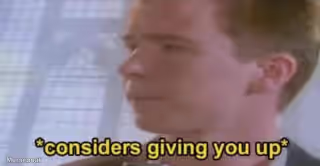
A close-up frame of the Rick Astley video used for the classic rickroll prank, perfect for bait-and-switch jokes and fake link reveals. Caption it free.
Blank Rickroll Zoomed In meme template
Download the blank Rickroll Zoomed In template to caption it yourself, or add your text right here in the editor above and download the finished meme.
When to use the Rickroll Zoomed In meme
- baiting someone with a fake link
- classic internet prank
Rickroll Zoomed In template facts
- Dimensions
- 480 × 360 px
- Format
- JPG
- Text boxes
- 2
- Added
- 2025
About the Rickroll Zoomed In meme template
A close-up still of a man with reddish-blond hair singing into a silver microphone, his face filling the frame against a pale, blurred background. He looks straight into the camera with his mouth open mid-line. Used to bait someone with a fake link that secretly sends them to a music video instead.
Popular Rickroll Zoomed In caption ideas
The homework answers · Never gonna give you up
Your package tracking link · It's actually this
The secret recipe you wanted · Nope, just Rick
Templates similar to Rickroll Zoomed In




Rickroll Zoomed In meme FAQ
How do I make a Rickroll Zoomed In meme?
Scroll up to the Rickroll Zoomed In template, type your caption into the 2 text boxes in the editor above, adjust the font, size and color if you like, then click download. Your finished Rickroll Zoomed In meme is ready to share in seconds.
Can I use the Rickroll Zoomed In template for free?
Yes. The Rickroll Zoomed In template is completely free to use — no signup and no limits on how many memes you create or where you share them.
How do I download my Rickroll Zoomed In meme?
Click the download button under the editor once your Rickroll Zoomed In meme looks right. It saves straight to your device as a high-quality PNG or JPEG image.
How do I download the blank Rickroll Zoomed In template?
Use the "Download blank template" button in the blank Rickroll Zoomed In template section above to save the original, un-captioned image — handy if you'd rather caption it in another app or keep a copy.