
Rias Gremory Meme Generator
Create Your Rias Gremory Meme
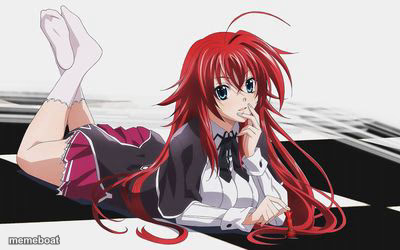
Rias Gremory from High School DxD lounging on the floor with a coy look — perfect for flirty, smug, or 'watching you' anime captions.
Blank Rias Gremory meme template
Download the blank Rias Gremory template to caption it yourself, or add your text right here in the editor above and download the finished meme.
When to use the Rias Gremory meme
- Catching someone staring and not looking away
- Smugly knowing something others don't
- Relaxing while chaos happens around you
- Flirty 'I see what you did there' reaction
Rias Gremory template facts
- Featuring
- Rias Gremory (High School DxD)
- Dimensions
- 400 × 250 px
- Format
- JPG
- Text boxes
- 1
- Added
- 2025
About the Rias Gremory meme template
Rias, striking red hair and all, propped up on the floor with that half-smile that says she already knows exactly what you're thinking. Classic High School DxD energy — confident, a little teasing, fully aware of the room.
Great for smug reaction captions, 'I see you' moments, or any anime-fan joke about being caught staring, scheming, or just vibing better than everyone else.
Popular Rias Gremory caption ideas
me pretending I didn't see that text
when you already know you're winning the argument
just vibing while everyone else panics
Templates similar to Rias Gremory



Rias Gremory meme FAQ
How do I make a Rias Gremory meme?
Scroll up to the Rias Gremory template, type your caption into the text box in the editor above, adjust the font, size and color if you like, then click download. Your finished Rias Gremory meme is ready to share in seconds.
Can I use the Rias Gremory template for free?
Yes. The Rias Gremory template is completely free to use — no signup and no limits on how many memes you create or where you share them.
How do I download my Rias Gremory meme?
Click the download button under the editor once your Rias Gremory meme looks right. It saves straight to your device as a high-quality PNG or JPEG image.
How do I download the blank Rias Gremory template?
Use the "Download blank template" button in the blank Rias Gremory template section above to save the original, un-captioned image — handy if you'd rather caption it in another app or keep a copy.