
reteP niffirG Meme Generator
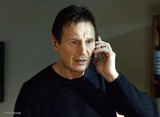
Peter Griffin standing plain and unbothered in his green shirt — the go-to reaction template for dumb confidence and bad decisions. Free to caption.
Create Your reteP niffirG Meme
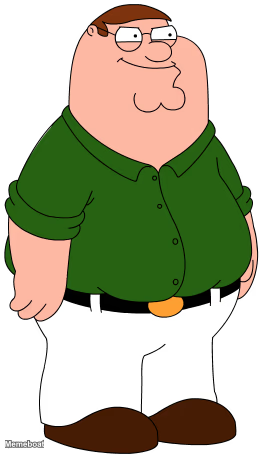
Blank reteP niffirG meme template
Download the blank reteP niffirG template to caption it yourself, or add your text right here in the editor above and download the finished meme.
When to use the reteP niffirG meme
- Announcing a terrible plan like it's genius
- Reacting to your own bad life choices with zero shame
- That deadpan 'well, actually' moment before something dumb
reteP niffirG template facts
- Featuring
- Peter Griffin (Family Guy)
- Dimensions
- 262 × 459 px
- Format
- PNG
- Text boxes
- 2
- Added
- 2026
About the reteP niffirG meme template
Peter Griffin, cut out and standing there like he's about to say something incredibly stupid with total confidence — because he is. No background, no context, just Peter in his signature green shirt, ready to carry whatever chaotic thought you're having.
Popular reteP niffirG caption ideas
ME EXPLAINING WHY I · DESERVE A RAISE FOR SHOWING UP
WHEN SOMEONE ASKS IF I'M OKAY · "I'M GREAT ACTUALLY"
MY FINANCIAL ADVISOR: · "JUST BUY MORE STUFF"
reteP niffirG meme FAQ
How do I make a reteP niffirG meme?
Scroll up to the reteP niffirG template, type your caption into the 2 text boxes in the editor above, adjust the font, size and color if you like, then click download. Your finished reteP niffirG meme is ready to share in seconds.
Can I use the reteP niffirG template for free?
Yes. The reteP niffirG template is completely free to use — no signup and no limits on how many memes you create or where you share them.
How do I download my reteP niffirG meme?
Click the download button under the editor once your reteP niffirG meme looks right. It saves straight to your device as a high-quality PNG or JPEG image.
How do I download the blank reteP niffirG template?
Use the "Download blank template" button in the blank reteP niffirG template section above to save the original, un-captioned image — handy if you'd rather caption it in another app or keep a copy.