
pether nortal Meme Generator
Create Your pether nortal Meme
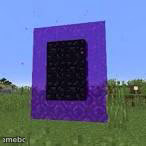
A glowing purple Minecraft nether portal frame, great for 'crossing into another dimension' or 'point of no return' jokes. Free to caption and download.
Blank pether nortal meme template
Download the blank pether nortal template to caption it yourself, or add your text right here in the editor above and download the finished meme.
When to use the pether nortal meme
- About to send a risky text and there's no coming back from it
- Walking into Monday after a great weekend
- Deciding to open your bank app after a night out
- Committing to a decision you know is going to change everything
pether nortal template facts
- Featuring
- Nether Portal (Minecraft)
- Dimensions
- 146 × 146 px
- Format
- JPG
- Text boxes
- 2
- Added
- 2025
About the pether nortal meme template
The iconic obsidian-framed, purple-swirling nether portal from Minecraft, standing alone in a grassy field waiting for someone brave (or dumb) enough to walk through. It's simple, instantly recognizable, and screams 'about to make a life-altering decision.'
Popular pether nortal caption ideas
ME OPENING MY BANK APP · AFTER PAYDAY WEEKEND
ABOUT TO HIT SEND · ON THAT TEXT AT 2AM
WALKING INTO THE OFFICE · MONDAY MORNING
Templates similar to pether nortal





pether nortal meme FAQ
How do I make a pether nortal meme?
Scroll up to the pether nortal template, type your caption into the 2 text boxes in the editor above, adjust the font, size and color if you like, then click download. Your finished pether nortal meme is ready to share in seconds.
Can I use the pether nortal template for free?
Yes. The pether nortal template is completely free to use — no signup and no limits on how many memes you create or where you share them.
How do I download my pether nortal meme?
Click the download button under the editor once your pether nortal meme looks right. It saves straight to your device as a high-quality PNG or JPEG image.
How do I download the blank pether nortal template?
Use the "Download blank template" button in the blank pether nortal template section above to save the original, un-captioned image — handy if you'd rather caption it in another app or keep a copy.