
peeps Meme Generator
Create Your peeps Meme
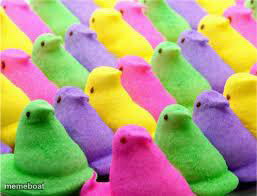
A grid of colorful marshmallow Peeps in neat rows — the go-to image for Easter candy jokes, sugar-overload humor, and 'too many of something' captions.
Blank peeps meme template
Download the blank peeps template to caption it yourself, or add your text right here in the editor above and download the finished meme.
When to use the peeps meme
- Easter candy stash confessions
- Describing your friend group's chaotic energy
- Any 'too many of the same thing' joke
- Sugar rush before a big event
peeps template facts
- Dimensions
- 257 × 196 px
- Format
- JPG
- Text boxes
- 1
- Added
- 2025
About the peeps meme template
Rows and rows of bunny-shaped marshmallow Peeps in pink, purple, yellow, and green, staring back at you like a tiny sugary army. It's cute, it's a little unsettling, and it's exactly the kind of image that makes a great backdrop for chaos.
Use it for Easter basket overload jokes, 'my group chat when' energy, or just roasting how much straight sugar is packed into one photo. Works great whenever you need a colorful crowd shot punchline.
Popular peeps caption ideas
HAPPY EASTER · TO ALL MY PEEPS
My blood sugar after Easter basket #1
The group chat when someone says 'who's free tonight'
Every version of me trying to look normal at 8am
Templates similar to peeps

peeps meme FAQ
How do I make a peeps meme?
Scroll up to the peeps template, type your caption into the text box in the editor above, adjust the font, size and color if you like, then click download. Your finished peeps meme is ready to share in seconds.
Can I use the peeps template for free?
Yes. The peeps template is completely free to use — no signup and no limits on how many memes you create or where you share them.
How do I download my peeps meme?
Click the download button under the editor once your peeps meme looks right. It saves straight to your device as a high-quality PNG or JPEG image.
How do I download the blank peeps template?
Use the "Download blank template" button in the blank peeps template section above to save the original, un-captioned image — handy if you'd rather caption it in another app or keep a copy.