
Happy Easter Meme Generator
Create Your Happy Easter Meme
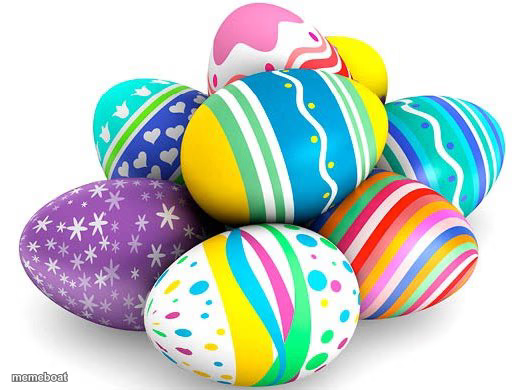
A pile of brightly patterned Easter eggs in every color and design — the classic holiday stock photo. Caption it free and download for Easter memes.
Blank Happy Easter meme template
Download the blank Happy Easter template to caption it yourself, or add your text right here in the editor above and download the finished meme.
When to use the Happy Easter meme
- Comparing your weird family members to a basket of mismatched eggs
- Posting a generic but cheerful holiday greeting
- Joking about how much candy is about to be consumed
- Describing a chaotic group project where everyone's doing their own thing
Happy Easter template facts
- Dimensions
- 529 × 390 px
- Format
- JPG
- Added
- 2025
About the Happy Easter meme template
A cheerful stack of hand-painted Easter eggs, stripes, polka dots, hearts, in every color you can think of. It's the stock photo energy of every Easter flyer and grandma's Facebook post.
Good for holiday jokes, comparing people to a basket of different personalities, or just captioning the chaos of family gatherings dressed up as something cute and seasonal.
Popular Happy Easter caption ideas
Happy Easter Everyone in The Fun Stream · Hope it goes well for you guys!
Templates similar to Happy Easter



Happy Easter meme FAQ
How do I make a Happy Easter meme?
Scroll up to the Happy Easter template, add your own text boxes in the editor above and type your captions, adjust the font, size and color if you like, then click download. Your finished Happy Easter meme is ready to share in seconds.
Can I use the Happy Easter template for free?
Yes. The Happy Easter template is completely free to use — no signup and no limits on how many memes you create or where you share them.
How do I download my Happy Easter meme?
Click the download button under the editor once your Happy Easter meme looks right. It saves straight to your device as a high-quality PNG or JPEG image.
How do I download the blank Happy Easter template?
Use the "Download blank template" button in the blank Happy Easter template section above to save the original, un-captioned image — handy if you'd rather caption it in another app or keep a copy.