
Nugget Meme Generator
Create Your Nugget Meme
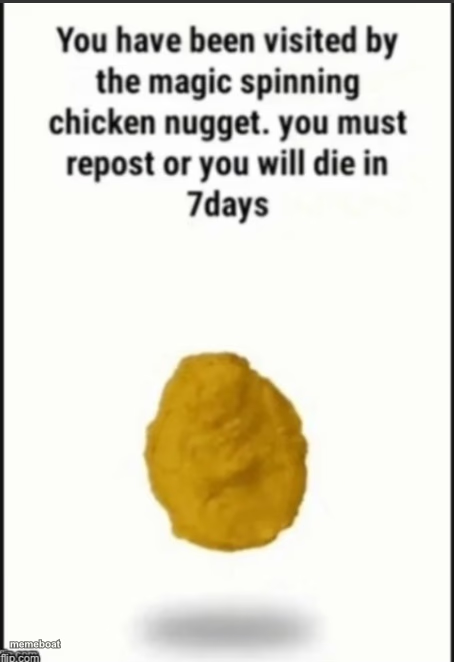
The 'You have been visited by the magic spinning chicken nugget' repost copypasta on a plain white background. Add your own twist and download free.
Blank Nugget meme template
Download the blank Nugget template to caption it yourself, or add your text right here in the editor above and download the finished meme.
When to use the Nugget meme
- Forcing a group chat repost chain over something trivial
- Threatening 7 years of bad luck for missing a group photo
- Any fake curse or superstition template
- Guilt-tripping someone into liking your post
Nugget template facts
- Dimensions
- 454 × 662 px
- Format
- PNG
- Text boxes
- 2
- Added
- 2025
About the Nugget meme template
A lone chicken nugget floats on a blank white background under the sacred chain-mail text: repost or face doom in 7 days. It's the internet's most beloved fake curse, powered entirely by fried chicken and vibes.
Use it for absurdist threats, fake superstitions, or just to force your friends to repost something dumb out of mild anxiety. The nugget demands nothing less.
Popular Nugget caption ideas
YOU HAVE BEEN VISITED BY THE MAGIC NUGGET · LIKE THIS OR YOUR WIFI DIES TONIGHT
REPOST THIS NUGGET · OR YOUR CHARGER WILL STOP WORKING RANDOMLY
THE NUGGET HAS CHOSEN YOU · IGNORE AT YOUR OWN RISK
Templates similar to Nugget
Nugget meme FAQ
How do I make a Nugget meme?
Scroll up to the Nugget template, type your caption into the 2 text boxes in the editor above, adjust the font, size and color if you like, then click download. Your finished Nugget meme is ready to share in seconds.
Can I use the Nugget template for free?
Yes. The Nugget template is completely free to use — no signup and no limits on how many memes you create or where you share them.
How do I download my Nugget meme?
Click the download button under the editor once your Nugget meme looks right. It saves straight to your device as a high-quality PNG or JPEG image.
How do I download the blank Nugget template?
Use the "Download blank template" button in the blank Nugget template section above to save the original, un-captioned image — handy if you'd rather caption it in another app or keep a copy.