
Idk Meme Generator
Create Your Idk Meme
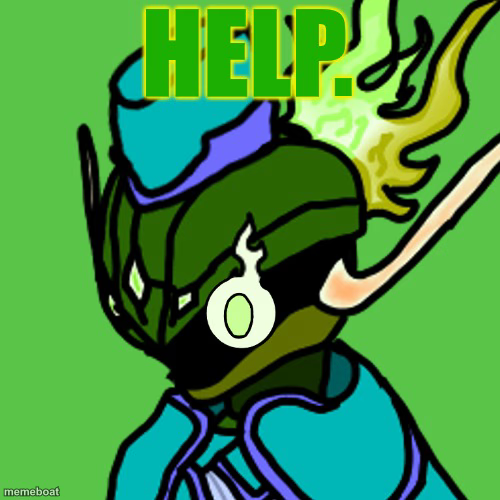
A cartoon green robot/knight with a glowing yellow flame mohawk yelling HELP. Use it for any moment you're in over your head. Caption it free.
Blank Idk meme template
Download the blank Idk template to caption it yourself, or add your text right here in the editor above and download the finished meme.
When to use the Idk meme
- Watching your code build for production with zero tests
- When the group chat starts planning without you
Idk template facts
- Dimensions
- 500 × 500 px
- Format
- JPG
- Text boxes
- 2
- Added
- 2025
About the Idk meme template
Nobody knows this guy's name, but everybody knows the feeling. A blocky green armored robot-knight with a glowing yellow flame shooting off the back of his head, single glowing eye wide open, and the word HELP already stamped across the top like he beat you to the punchline.
It's the perfect template for that split second before everything goes wrong — a deploy on Friday, a group project, a bill you forgot about. Drop your own top or bottom text and let the little green guy panic on your behalf.
Popular Idk caption ideas
ME REALIZING · IT'S DUE TODAY, NOT TOMORROW
WHEN THE WIFI DROPS · DURING THE BOSS FIGHT
MY BRAIN AT 3AM · REMEMBERING THAT EMBARRASSING THING FROM 2019


Idk meme FAQ
How do I make a Idk meme?
Scroll up to the Idk template, type your caption into the 2 text boxes in the editor above, adjust the font, size and color if you like, then click download. Your finished Idk meme is ready to share in seconds.
Can I use the Idk template for free?
Yes. The Idk template is completely free to use — no signup and no limits on how many memes you create or where you share them.
How do I download my Idk meme?
Click the download button under the editor once your Idk meme looks right. It saves straight to your device as a high-quality PNG or JPEG image.
How do I download the blank Idk template?
Use the "Download blank template" button in the blank Idk template section above to save the original, un-captioned image — handy if you'd rather caption it in another app or keep a copy.