
Morse Code Meme Generator
Create Your Morse Code Meme
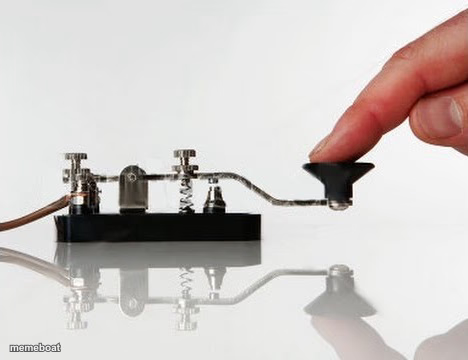
A close-up of a hand pressing an old-fashioned Morse code telegraph key. Great for slow, tedious, or outdated-communication jokes. Free to caption.
Blank Morse Code meme template
Download the blank Morse Code template to caption it yourself, or add your text right here in the editor above and download the finished meme.
When to use the Morse Code meme
- Waiting forever for someone to text back
- Explaining technology to an older relative
- How slow customer support feels
- Doing something the hard, outdated way on purpose
Morse Code template facts
- Dimensions
- 468 × 360 px
- Format
- JPG
- Text boxes
- 1
- Added
- 2025
About the Morse Code meme template
One finger, one tiny brass lever, and the ancient art of tapping out messages one dot and dash at a time. It's the perfect visual for anything painfully slow, deliberately old-school, or hilariously overcomplicated compared to just texting.
Drop in captions about waiting for a reply, explaining something to your grandparents, or how long it takes IT to respond to a simple ticket.
Popular Morse Code caption ideas
ME EXPLAINING WHY I'M LATE VIA THIS INSTEAD OF JUST CALLING
IT SUPPORT RESPONDING TO MY TICKET
SENDING 'U UP?' AT 2AM LIKE
Templates similar to Morse Code



Morse Code meme FAQ
How do I make a Morse Code meme?
Scroll up to the Morse Code template, type your caption into the text box in the editor above, adjust the font, size and color if you like, then click download. Your finished Morse Code meme is ready to share in seconds.
Can I use the Morse Code template for free?
Yes. The Morse Code template is completely free to use — no signup and no limits on how many memes you create or where you share them.
How do I download my Morse Code meme?
Click the download button under the editor once your Morse Code meme looks right. It saves straight to your device as a high-quality PNG or JPEG image.
How do I download the blank Morse Code template?
Use the "Download blank template" button in the blank Morse Code template section above to save the original, un-captioned image — handy if you'd rather caption it in another app or keep a copy.