
App Leave Confirmation Screen Meme Generator
Create Your App Leave Confirmation Screen Meme
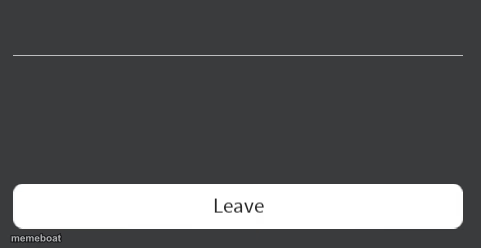
Also known as: Roblox error code with leave button
A blank dark app dialog with a white 'Leave' button — a versatile template for jokes about quitting, giving up, or exiting a situation. Free to caption and download.
Blank App Leave Confirmation Screen meme template
Download the blank App Leave Confirmation Screen template to caption it yourself, or add your text right here in the editor above and download the finished meme.
When to use the App Leave Confirmation Screen meme
- giving up on something
- quitting a group or game
- walking away from drama
- dark humor exits
App Leave Confirmation Screen template facts
- Dimensions
- 481 × 248 px
- Format
- PNG
- Text boxes
- 2
- Added
- 2025
About the App Leave Confirmation Screen meme template
The "Roblox error code with leave button" meme template has quickly become a staple in internet culture, especially among gaming communities. Originating from Roblox's frequent in-game error messages, this meme captures the frustration and humor players experience when encountering unexpected glitches. Since its rise to popularity on platforms like TikTok and Twitter in 2023, it has evolved into a viral phenomenon, symbolizing relatable moments of digital mishaps. This meme type perfectly blends gaming culture with comedic relief, making it a favorite for social media users looking to connect through shared online experiences.
Knowing how to use the Roblox error code meme template effectively can elevate your social media content and engage your audience with funny reactions and relatable moments. This template is perfect for expressing frustration, surprise, or humorous defeat in gaming or everyday tech scenarios. Whether you're wondering how to make a Roblox error code meme or when to post it, this format works well for Instagram stories, Twitter threads, or TikTok videos where quick, shareable humor thrives. Its versatility allows creators to customize text to fit various contexts, making it ideal for meme makers aiming to capture trending online conversations and entertain followers.
The Roblox error code meme remains popular because it taps into a universal experience shared by millions of gamers and internet users. With our easy-to-use online generator, you can create, customize, and personalize your own Roblox error code memes instantly—no design skills needed. This meme maker delivers instant results, helping you build viral content that resonates across Facebook, Instagram, and TikTok. Start generating your funny, shareable memes now and join the viral wave with a template that’s as entertaining as it is relatable. Don’t wait—make your Roblox error code meme today and watch your social media engagement soar!
Popular App Leave Confirmation Screen caption ideas
Disconnected · You are already playing a game. Please shut down the other game and try again (error code:264)
Error · You have already played the game for 24 hours, Now go to sleep until tomorrow!
Templates similar to App Leave Confirmation Screen

App Leave Confirmation Screen meme FAQ
How do I make a App Leave Confirmation Screen meme?
Scroll up to the App Leave Confirmation Screen template, type your caption into the 2 text boxes in the editor above, adjust the font, size and color if you like, then click download. Your finished App Leave Confirmation Screen meme is ready to share in seconds.
Can I use the App Leave Confirmation Screen template for free?
Yes. The App Leave Confirmation Screen template is completely free to use — no signup and no limits on how many memes you create or where you share them.
How do I download my App Leave Confirmation Screen meme?
Click the download button under the editor once your App Leave Confirmation Screen meme looks right. It saves straight to your device as a high-quality PNG or JPEG image.
How do I download the blank App Leave Confirmation Screen template?
Use the "Download blank template" button in the blank App Leave Confirmation Screen template section above to save the original, un-captioned image — handy if you'd rather caption it in another app or keep a copy.