
Monad Meme Generator
Create Your Monad Meme
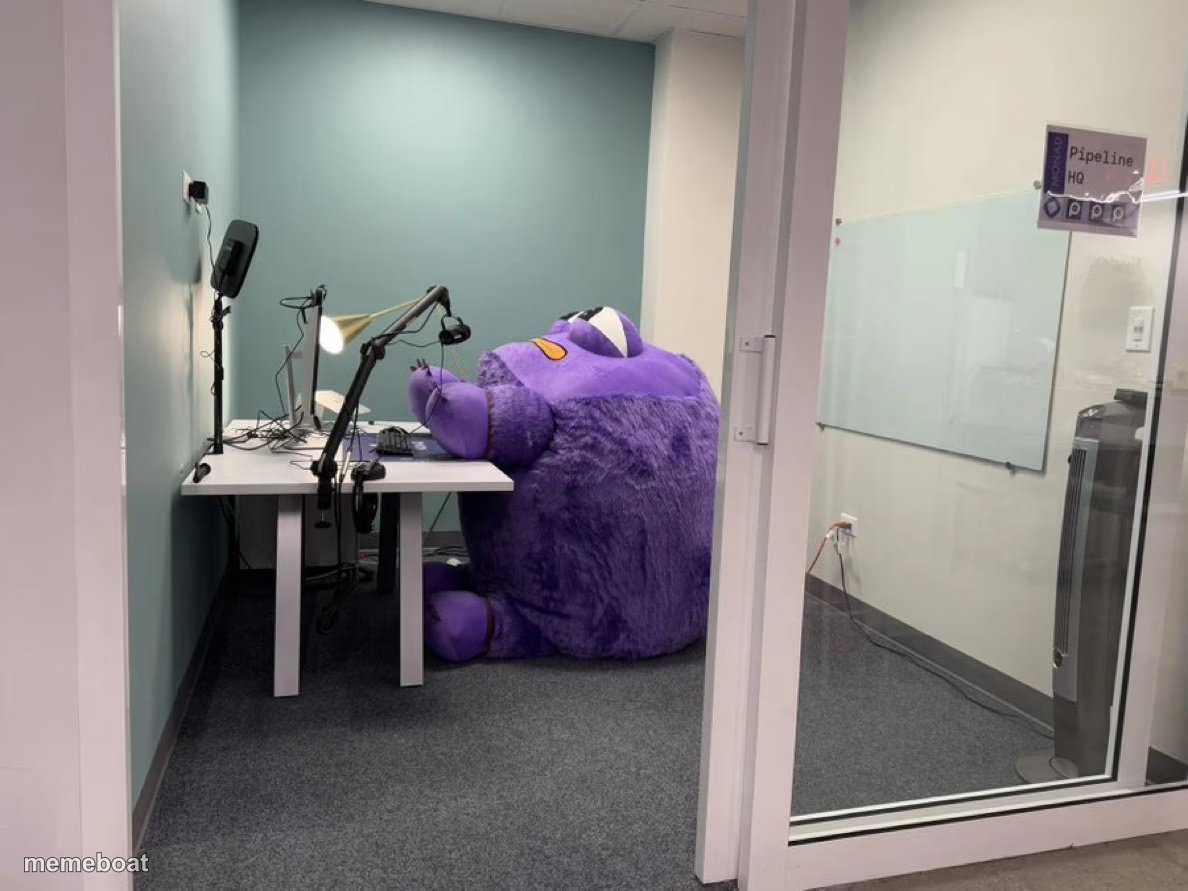
A massive purple plush mascot squeezed into a tiny podcast booth behind a desk mic. Caption it and download free.
Blank Monad meme template
Download the blank Monad template to caption it yourself, or add your text right here in the editor above and download the finished meme.
When to use the Monad meme
- when the new hire's personality doesn't fit in the tiny cubicle they gave him
- trying to cram a huge task into a meeting that was only booked for 15 minutes
- that one coworker who takes up all the space in every group project
Monad template facts
- Dimensions
- 1188 × 891 px
- Format
- JPG
- Text boxes
- 1
- Added
- 2025
About the Monad meme template
Somebody ordered the mascot costume in extra-extra-large and forgot to measure the recording booth first. Now there's a huge purple fuzzy creature wedged behind a desk mic and ring light, taking up the entire room like it showed up to record a solo podcast episode nobody asked for.
Use this one for any time something (or someone) is way too big for the space they've been crammed into — a meeting that needed a bigger room, a personality too large for the job, or just the universal feeling of not fitting where you're supposed to fit.
Popular Monad caption ideas
BUSY YEAR🔥🔥
ME TRYING TO FIT MY ENTIRE PERSONALITY INTO A 15-MINUTE STANDUP
WHEN THE RECORDING BOOTH WAS BUILT FOR HUMANS AND YOU ARE NOT ONE
MY OPINIONS SHOWING UP TO THE MEETING THAT DIDN'T ASK FOR THEM
Templates similar to Monad






Monad meme FAQ
How do I make a Monad meme?
Scroll up to the Monad template, type your caption into the text box in the editor above, adjust the font, size and color if you like, then click download. Your finished Monad meme is ready to share in seconds.
Can I use the Monad template for free?
Yes. The Monad template is completely free to use — no signup and no limits on how many memes you create or where you share them.
How do I download my Monad meme?
Click the download button under the editor once your Monad meme looks right. It saves straight to your device as a high-quality PNG or JPEG image.
How do I download the blank Monad template?
Use the "Download blank template" button in the blank Monad template section above to save the original, un-captioned image — handy if you'd rather caption it in another app or keep a copy.