
Confused Toddler Carseat Meme Generator
Create Your Confused Toddler Carseat Meme
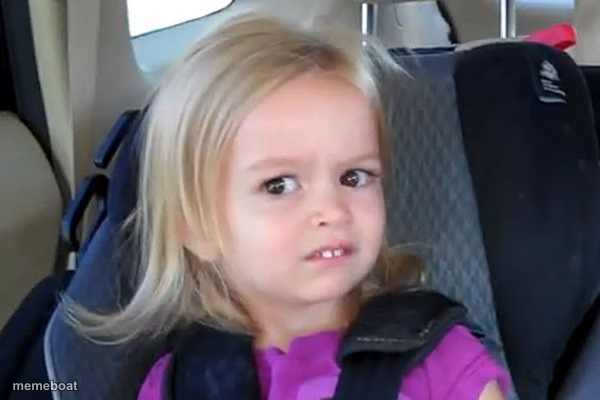
A little girl in a carseat pulling a baffled, judgmental side-eye — perfect for reacting to nonsense with pure toddler skepticism. Caption it free.
Blank Confused Toddler Carseat meme template
Download the blank Confused Toddler Carseat template to caption it yourself, or add your text right here in the editor above and download the finished meme.
When to use the Confused Toddler Carseat meme
- Reacting to an obvious lie with zero patience for it
- When someone explains a plan that makes no sense
- The face you make hearing 'it's not that deep' about something that is
- Overhearing your parents argue about directions from the backseat
Confused Toddler Carseat template facts
- Dimensions
- 600 × 400 px
- Format
- JPG
- Added
- 2025
About the Confused Toddler Carseat meme template
This kid is buckled into her carseat and has clearly heard something she does not believe for one second. That scrunched nose, that side-eye — it's the face of a toddler who is not falling for whatever you just said.
Templates similar to Confused Toddler Carseat


Confused Toddler Carseat meme FAQ
How do I make a Confused Toddler Carseat meme?
Scroll up to the Confused Toddler Carseat template, add your own text boxes in the editor above and type your captions, adjust the font, size and color if you like, then click download. Your finished Confused Toddler Carseat meme is ready to share in seconds.
Can I use the Confused Toddler Carseat template for free?
Yes. The Confused Toddler Carseat template is completely free to use — no signup and no limits on how many memes you create or where you share them.
How do I download my Confused Toddler Carseat meme?
Click the download button under the editor once your Confused Toddler Carseat meme looks right. It saves straight to your device as a high-quality PNG or JPEG image.
How do I download the blank Confused Toddler Carseat template?
Use the "Download blank template" button in the blank Confused Toddler Carseat template section above to save the original, un-captioned image — handy if you'd rather caption it in another app or keep a copy.