
Angry Toddler Meme Generator
Create Your Angry Toddler Meme
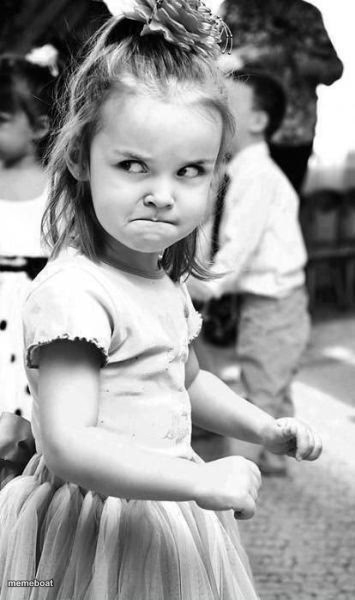
A tiny girl in a tutu balls up her fists and scowls like she's about to throw hands. Perfect for petty rage. Caption it free on Memebo.at.
Blank Angry Toddler meme template
Download the blank Angry Toddler template to caption it yourself, or add your text right here in the editor above and download the finished meme.
Angry Toddler template facts
- Dimensions
- 355 × 600 px
- Format
- JPG
- Text boxes
- 2
- Added
- 2025
About the Angry Toddler meme template
This kid is done. Absolutely done. She's dressed like she's headed to a garden party but her face and fists say she's about to start a fight in the parking lot afterward. It's the gap between how adorable she looks and how furious she is that makes this one work every time.
Use it for tiny-but-mighty rage: getting cut off in traffic, someone taking your parking spot, your sibling eating your leftovers. Big feelings, small human, maximum chaos energy.
Popular Angry Toddler caption ideas
ME · AFTER ONE (1) SIP OF COFFEE, READY TO END SOMEONE
WHEN THEY SAY "CAN I GET A REFUND" · MY SOUL LEAVING MY BODY
SIBLING: I DIDN'T EAT YOUR LEFTOVERS · THE EMPTY CONTAINER IN THE TRASH
Templates similar to Angry Toddler


Angry Toddler meme FAQ
How do I make a Angry Toddler meme?
Scroll up to the Angry Toddler template, type your caption into the 2 text boxes in the editor above, adjust the font, size and color if you like, then click download. Your finished Angry Toddler meme is ready to share in seconds.
Can I use the Angry Toddler template for free?
Yes. The Angry Toddler template is completely free to use — no signup and no limits on how many memes you create or where you share them.
How do I download my Angry Toddler meme?
Click the download button under the editor once your Angry Toddler meme looks right. It saves straight to your device as a high-quality PNG or JPEG image.
How do I download the blank Angry Toddler template?
Use the "Download blank template" button in the blank Angry Toddler template section above to save the original, un-captioned image — handy if you'd rather caption it in another app or keep a copy.