
Kahoot Quiz Screen Meme Generator
Create Your Kahoot Quiz Screen Meme
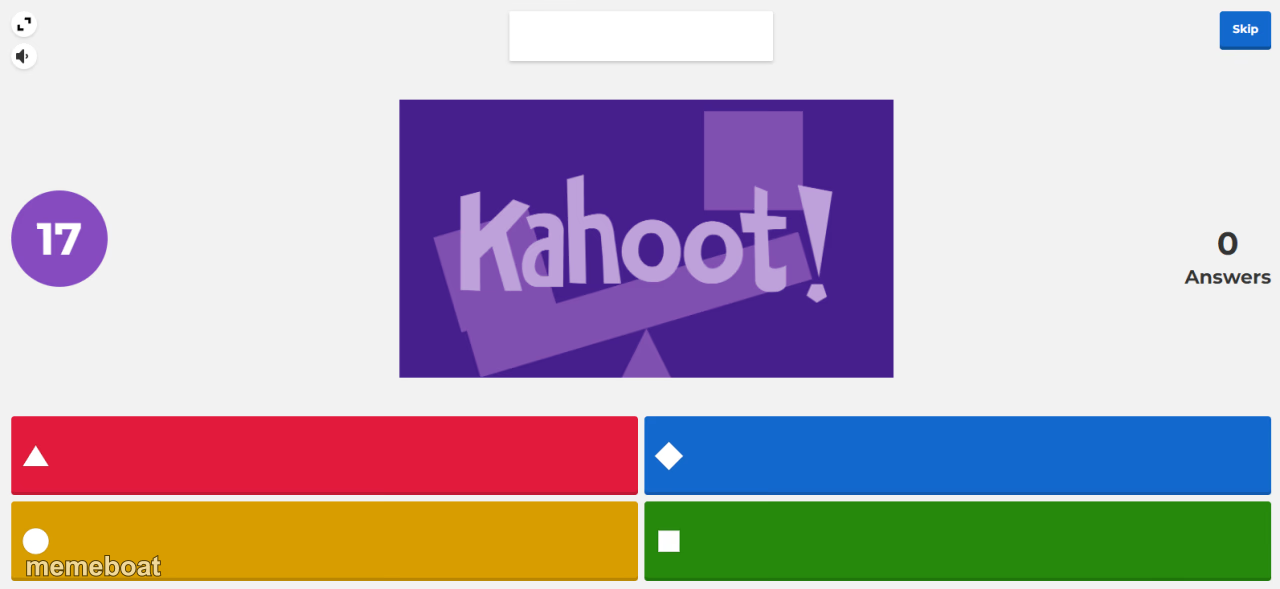
Also known as: KAHOOT MEME
A Kahoot quiz question screen with four colored answer options and no responses yet. Fits classroom humor, waiting-for-answers, or awkward silence jokes. Caption and download free.
Blank Kahoot Quiz Screen meme template
Download the blank Kahoot Quiz Screen template to caption it yourself, or add your text right here in the editor above and download the finished meme.
When to use the Kahoot Quiz Screen meme
- awkward silence in class
- waiting for someone to answer
- classroom quiz humor
- everyone stalling
Kahoot Quiz Screen template facts
- Dimensions
- 1280 × 589 px
- Format
- PNG
- Text boxes
- 6
- Added
- 2025
About the Kahoot Quiz Screen meme template
The KAHOOT MEME template has become a standout fixture in internet culture, captivating meme enthusiasts worldwide. Originating from the popular Kahoot! quiz platform, this meme gained viral momentum around 2020 on social media channels like Twitter and TikTok. It cleverly combines the suspense of quiz moments with humorous captions, often incorporating trending tags like sussy baka, LOLBEANS, and ALWAYS HAS BEEN. As a viral phenomenon, the KAHOOT MEME reflects the dynamic and playful spirit of online meme culture, making it a favorite for expressing relatable, funny reactions.
Knowing how to use the KAHOOT MEME template effectively can elevate your social media content and boost engagement. Perfect for funny reactions, playful roasts, or highlighting unexpected truths, this meme fits well in casual conversations and entertainment posts. Whether you’re wondering how to make a KAHOOT MEME or when to post it, this template thrives in moments where humor and surprise collide. It’s ideal for Instagram stories, Twitter threads, TikTok videos, and Facebook posts, helping you connect with audiences through relatable moments and viral comedy.
The KAHOOT MEME remains popular because it’s incredibly easy to create, customize, and share. With our online meme maker, you can generate personalized KAHOOT MEME content instantly—no design skills needed. This quick and free generator lets you add custom text to capture your unique message and humor, maximizing your meme’s viral potential. Join millions who have already embraced this trending meme format and start creating your own hilarious KAHOOT MEME now. Don’t wait—make your meme, share it across social media, and watch the laughs roll in!
Templates similar to Kahoot Quiz Screen


Kahoot Quiz Screen meme FAQ
How do I make a Kahoot Quiz Screen meme?
Scroll up to the Kahoot Quiz Screen template, type your caption into the 6 text boxes in the editor above, adjust the font, size and color if you like, then click download. Your finished Kahoot Quiz Screen meme is ready to share in seconds.
Can I use the Kahoot Quiz Screen template for free?
Yes. The Kahoot Quiz Screen template is completely free to use — no signup and no limits on how many memes you create or where you share them.
How do I download my Kahoot Quiz Screen meme?
Click the download button under the editor once your Kahoot Quiz Screen meme looks right. It saves straight to your device as a high-quality PNG or JPEG image.
How do I download the blank Kahoot Quiz Screen template?
Use the "Download blank template" button in the blank Kahoot Quiz Screen template section above to save the original, un-captioned image — handy if you'd rather caption it in another app or keep a copy.