
Is that a google pixel 7!? Meme Generator
Create Your Is that a google pixel 7!? Meme
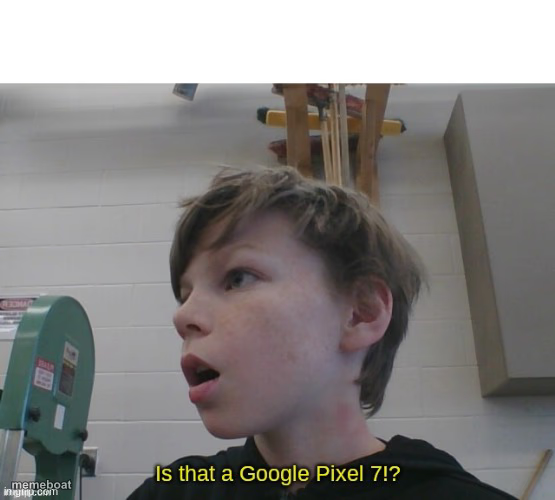
A kid stares off in shock asking if that's a Google Pixel 7 — the perfect reaction for spotting anything impressive or expensive. Caption it free.
Blank Is that a google pixel 7!? meme template
Download the blank Is that a google pixel 7!? template to caption it yourself, or add your text right here in the editor above and download the finished meme.
When to use the Is that a google pixel 7!? meme
- Spotting someone's brand new phone or gadget across the room
- Reacting to a friend showing off an expensive purchase
- Any 'wait, is that real?' double-take moment
Is that a google pixel 7!? template facts
- Dimensions
- 555 × 500 px
- Format
- JPG
- Text boxes
- 1
- Added
- 2025
About the Is that a google pixel 7!? meme template
A kid in a workshop or classroom whips his head around, jaw dropped, eyes locked on something off-camera like he just spotted the newest flagship phone in the wild. The energy is pure tech-obsessed double-take.
Popular Is that a google pixel 7!? caption ideas
Is that a Google Pixel 7!?
Templates similar to Is that a google pixel 7!?




Is that a google pixel 7!? meme FAQ
How do I make a Is that a google pixel 7!? meme?
Scroll up to the Is that a google pixel 7!? template, type your caption into the text box in the editor above, adjust the font, size and color if you like, then click download. Your finished Is that a google pixel 7!? meme is ready to share in seconds.
Can I use the Is that a google pixel 7!? template for free?
Yes. The Is that a google pixel 7!? template is completely free to use — no signup and no limits on how many memes you create or where you share them.
How do I download my Is that a google pixel 7!? meme?
Click the download button under the editor once your Is that a google pixel 7!? meme looks right. It saves straight to your device as a high-quality PNG or JPEG image.
How do I download the blank Is that a google pixel 7!? template?
Use the "Download blank template" button in the blank Is that a google pixel 7!? template section above to save the original, un-captioned image — handy if you'd rather caption it in another app or keep a copy.