
Google Choosing Chrome Meme Generator
Create Your Google Choosing Chrome Meme
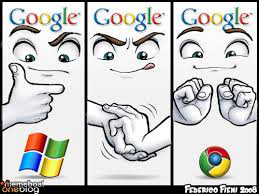
Google's cartoon avatar pointing, then fist-bumping Chrome over Windows — the perfect three-panel template for picking favorites and snubbing the rest. Free to caption.
Blank Google Choosing Chrome meme template
Download the blank Google Choosing Chrome template to caption it yourself, or add your text right here in the editor above and download the finished meme.
When to use the Google Choosing Chrome meme
- Comparing an old brand or product you dropped to your new favorite
- Showing your reaction going from disgust to approval across three options
- Ranking three things from worst to best in escalating fashion
Google Choosing Chrome template facts
- Featuring
- Google Points and Laughs / Loss meme style (Google Chrome ad meme)
- Dimensions
- 259 × 194 px
- Format
- JPG
- Added
- 2025
About the Google Choosing Chrome meme template
A three-panel comic of the Google mascot face pointing at Windows, recoiling in disgust, then happily fist-bumping the Chrome logo instead. It's a rejection arc told in three simple expressions.
Use it for any three-step 'this? no. THIS.' comparison — brands you dropped for a better one, people you used to date versus your current partner, old habits versus new ones. The panels do the emotional work; you just need to swap in the right identities.
Popular Google Choosing Chrome caption ideas
HOLD MY BEER · WINDOWS 10
Templates similar to Google Choosing Chrome

Google Choosing Chrome meme FAQ
How do I make a Google Choosing Chrome meme?
Scroll up to the Google Choosing Chrome template, add your own text boxes in the editor above and type your captions, adjust the font, size and color if you like, then click download. Your finished Google Choosing Chrome meme is ready to share in seconds.
Can I use the Google Choosing Chrome template for free?
Yes. The Google Choosing Chrome template is completely free to use — no signup and no limits on how many memes you create or where you share them.
How do I download my Google Choosing Chrome meme?
Click the download button under the editor once your Google Choosing Chrome meme looks right. It saves straight to your device as a high-quality PNG or JPEG image.
How do I download the blank Google Choosing Chrome template?
Use the "Download blank template" button in the blank Google Choosing Chrome template section above to save the original, un-captioned image — handy if you'd rather caption it in another app or keep a copy.