
i have 2 sides Meme Generator
Create Your i have 2 sides Meme
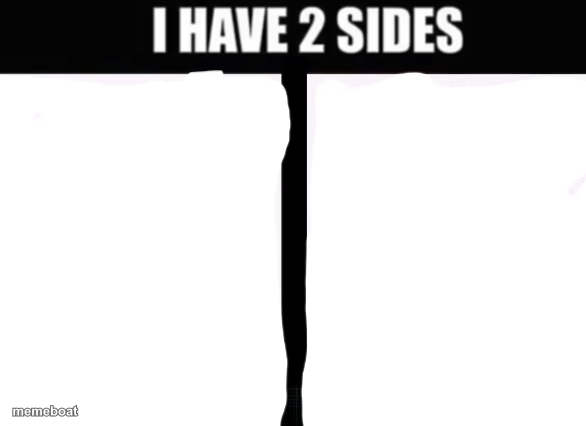
The classic 'I Have 2 Sides' split template — one crack down the middle, two blank halves. Perfect for contrasting personalities or moods. Free to caption and download.
Blank i have 2 sides meme template
Download the blank i have 2 sides template to caption it yourself, or add your text right here in the editor above and download the finished meme.
When to use the i have 2 sides meme
- Contrasting your calm public self with your unhinged private self
- Comparing weekday you vs. weekend you
- Showing a hobby persona vs. a work persona
- Any 'sweet' vs. 'feral' personality split
i have 2 sides template facts
- Featuring
- I Have 2 Sides (meme template)
- Dimensions
- 586 × 426 px
- Format
- PNG
- Added
- 2025
About the i have 2 sides meme template
A simple bold headline and one jagged crack splitting the page into two blank halves. This is the go-to template for 'two sides of me' jokes — one calm, one chaos, and nothing in between.
Works for personality contrasts, mood swings, hobbies vs. work life, or literally any duality you want to exaggerate for laughs.
Popular i have 2 sides caption ideas
HELO, HOW ARE YOU ON THIS FINE DAY! I HAVE STUDIED THE ARTS OF THE SOCIAL JUSTACE WARRIOR · PLEASE NO FIGHTING
Templates similar to i have 2 sides

i have 2 sides meme FAQ
How do I make a i have 2 sides meme?
Scroll up to the i have 2 sides template, add your own text boxes in the editor above and type your captions, adjust the font, size and color if you like, then click download. Your finished i have 2 sides meme is ready to share in seconds.
Can I use the i have 2 sides template for free?
Yes. The i have 2 sides template is completely free to use — no signup and no limits on how many memes you create or where you share them.
How do I download my i have 2 sides meme?
Click the download button under the editor once your i have 2 sides meme looks right. It saves straight to your device as a high-quality PNG or JPEG image.
How do I download the blank i have 2 sides template?
Use the "Download blank template" button in the blank i have 2 sides template section above to save the original, un-captioned image — handy if you'd rather caption it in another app or keep a copy.