
Hop In Buddy Meme Generator
Create Your Hop In Buddy Meme
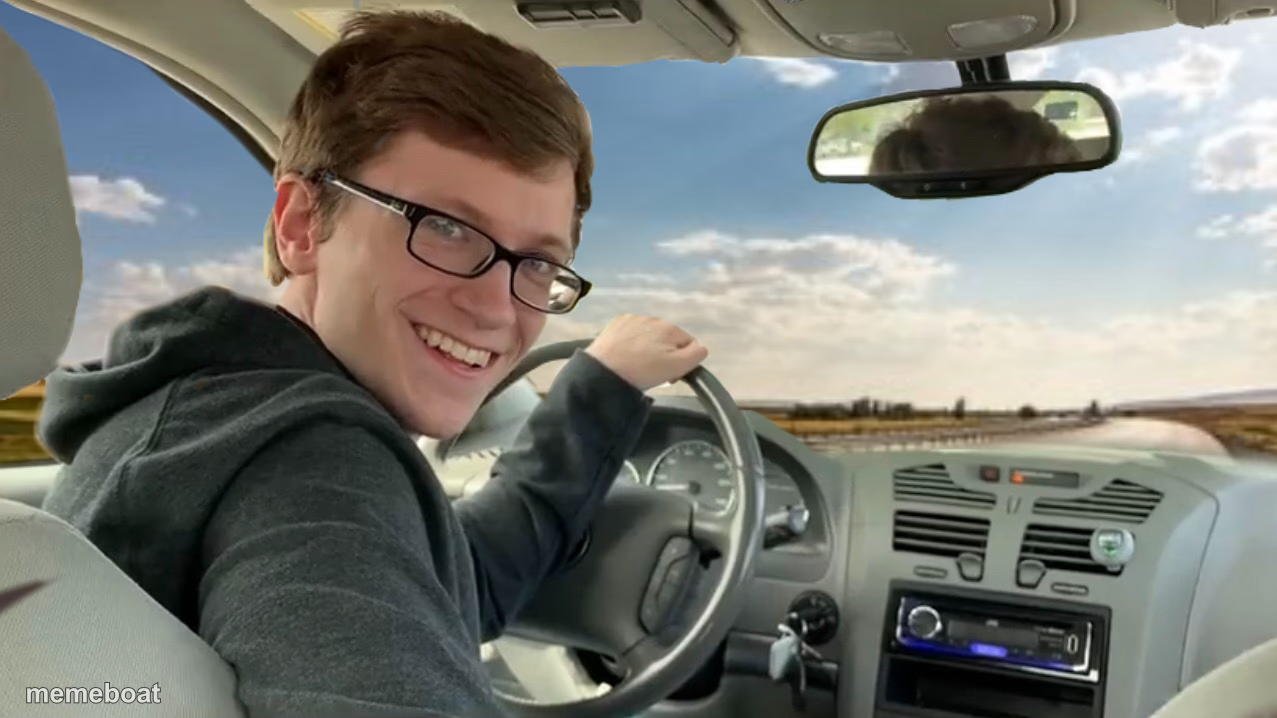
Grinning guy behind the wheel, looking back like he's about to make a questionable decision. Perfect for road-trip and bad-idea jokes — free to caption.
Blank Hop In Buddy meme template
Download the blank Hop In Buddy template to caption it yourself, or add your text right here in the editor above and download the finished meme.
When to use the Hop In Buddy meme
- Inviting friends into a plan that's clearly a bad idea
- Driving somewhere while ignoring the road to talk
- The friend who's way too enthusiastic about a 3am gas station run
- Announcing an unplanned road trip
Hop In Buddy template facts
- Dimensions
- 1277 × 718 px
- Format
- JPG
- Text boxes
- 1
- Added
- 2025
About the Hop In Buddy meme template
This guy is way too excited to be driving. Big glasses, big grin, one hand on the wheel while he twists around to talk to whoever's in the back seat — the energy of someone about to suggest a detour nobody asked for.
Popular Hop In Buddy caption ideas
HOP IN · WE’RE GOING TO FIND THE SLAVE AUCTION
Me driving us to a place I've never been with 3% battery on my phone
'Trust me I know a shortcut' - narrator: he did not
When you volunteer to drive just so you control the music
Templates similar to Hop In Buddy






Hop In Buddy meme FAQ
How do I make a Hop In Buddy meme?
Scroll up to the Hop In Buddy template, type your caption into the text box in the editor above, adjust the font, size and color if you like, then click download. Your finished Hop In Buddy meme is ready to share in seconds.
Can I use the Hop In Buddy template for free?
Yes. The Hop In Buddy template is completely free to use — no signup and no limits on how many memes you create or where you share them.
How do I download my Hop In Buddy meme?
Click the download button under the editor once your Hop In Buddy meme looks right. It saves straight to your device as a high-quality PNG or JPEG image.
How do I download the blank Hop In Buddy template?
Use the "Download blank template" button in the blank Hop In Buddy template section above to save the original, un-captioned image — handy if you'd rather caption it in another app or keep a copy.