
He's here Meme Generator
Create Your He's here Meme
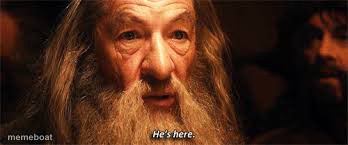
Gandalf's grave close-up saying "He's here" — the perfect ominous announcement caption for anyone or anything showing up unexpectedly. Free to caption.
Blank He's here meme template
Download the blank He's here template to caption it yourself, or add your text right here in the editor above and download the finished meme.
When to use the He's here meme
- Announcing someone's dramatic (but actually mundane) arrival
- The food delivery guy finally shows up
- That one friend who never replies suddenly texts back
He's here template facts
- Featuring
- Gandalf (The Lord of the Rings)
- Dimensions
- 348 × 145 px
- Format
- JPG
- Text boxes
- 1
- Added
- 2025
About the He's here meme template
Gandalf's face fills the frame, dead serious, delivering the line "He's here" like the fate of Middle-earth depends on it. That kind of gravity is exactly what makes it funny when you slap it onto something completely mundane.
Use it for the group chat when someone finally responds, when your food delivery driver arrives, or any moment that deserves way more drama than it actually has.
Popular He's here caption ideas
When your Duolingo streak breaks and you hear a knock on the door
He's here
The delivery driver, finally
Mom, checking the group chat
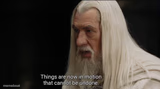
Templates similar to He's here

He's here meme FAQ
How do I make a He's here meme?
Scroll up to the He's here template, type your caption into the text box in the editor above, adjust the font, size and color if you like, then click download. Your finished He's here meme is ready to share in seconds.
Can I use the He's here template for free?
Yes. The He's here template is completely free to use — no signup and no limits on how many memes you create or where you share them.
How do I download my He's here meme?
Click the download button under the editor once your He's here meme looks right. It saves straight to your device as a high-quality PNG or JPEG image.
How do I download the blank He's here template?
Use the "Download blank template" button in the blank He's here template section above to save the original, un-captioned image — handy if you'd rather caption it in another app or keep a copy.