Herobrine Close-Up Meme Generator
Create Your Herobrine Close-Up Meme
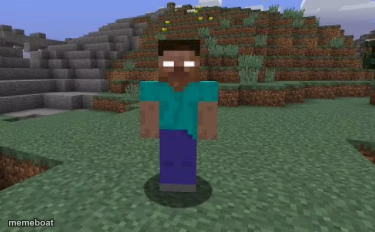
The blank-eyed Herobrine character standing near rocky hills, staring silently. Fits eerie, creepy or unsettling reaction jokes. Caption and download free.
Blank Herobrine Close-Up meme template
Download the blank Herobrine Close-Up template to caption it yourself, or add your text right here in the editor above and download the finished meme.
When to use the Herobrine Close-Up meme
- something feels off
- silent creepy stare
- unexpected dread
Herobrine Close-Up template facts
- Dimensions
- 375 × 232 px
- Format
- PNG
- Text boxes
- 2
- Added
- 2025
About the Herobrine Close-Up meme template
Herobrine from Minecraft stands on grass in a blocky close-up, wearing a teal shirt and purple trousers, with glowing white eyes staring straight at the viewer. Stone ridges and dirt hills fill the background. Used when something feels wrong and a silent, unblinking stare is the only reaction needed.
Popular Herobrine Close-Up caption ideas
If Herobrine isn't real · How did my dad die from a Herobrine overdose?
Me watching you · sleep-talk
When the wifi drops · mid-game
That silence · before bad news
Templates similar to Herobrine Close-Up


Herobrine Close-Up meme FAQ
How do I make a Herobrine Close-Up meme?
Scroll up to the Herobrine Close-Up template, type your caption into the 2 text boxes in the editor above, adjust the font, size and color if you like, then click download. Your finished Herobrine Close-Up meme is ready to share in seconds.
Can I use the Herobrine Close-Up template for free?
Yes. The Herobrine Close-Up template is completely free to use — no signup and no limits on how many memes you create or where you share them.
How do I download my Herobrine Close-Up meme?
Click the download button under the editor once your Herobrine Close-Up meme looks right. It saves straight to your device as a high-quality PNG or JPEG image.
How do I download the blank Herobrine Close-Up template?
Use the "Download blank template" button in the blank Herobrine Close-Up template section above to save the original, un-captioned image — handy if you'd rather caption it in another app or keep a copy.