
Gizmo Close Up Meme Generator
Create Your Gizmo Close Up Meme
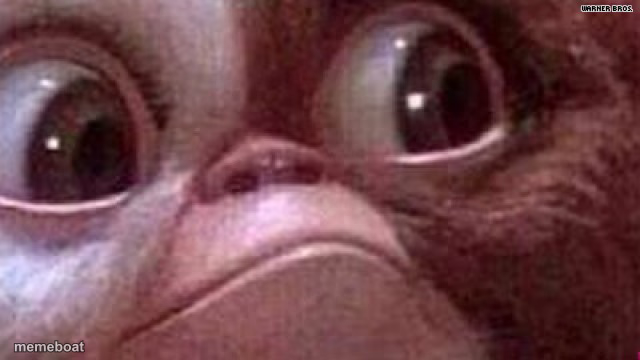
Gizmo the Mogwai staring wide-eyed in extreme close-up from Gremlins. Perfect for shock, disbelief, or 'wait what' reactions. Caption it free.
Blank Gizmo Close Up meme template
Download the blank Gizmo Close Up template to caption it yourself, or add your text right here in the editor above and download the finished meme.
When to use the Gizmo Close Up meme
- When you open your laptop and see 47 unread emails
- That look when someone says 'we need to talk'
- Seeing the total at checkout after 'just browsing'
Gizmo Close Up template facts
- Featuring
- Gizmo (Gremlins)
- Dimensions
- 640 × 360 px
- Format
- JPG
- Text boxes
- 2
- Added
- 2025
About the Gizmo Close Up meme template
Those enormous, unblinking eyes belong to Gizmo, the good-natured Mogwai from Gremlins, caught in the most extreme close-up a camera has ever dared. It's the face of pure, wordless alarm - the kind you make when you open your bank app or read a group chat notification at 2am.
Use this one anywhere you need to convey 'I have seen something I cannot unsee.' Add your own caption and it instantly becomes the perfect reaction to bad news, plot twists, or that split-second before everything goes wrong.
Popular Gizmo Close Up caption ideas
ME WHEN THE WIFI · BUFFERS DURING THE FINAL BOSS
WHEN YOU REALIZE · YOU REPLIED-ALL
THAT FACE WHEN · MONDAY SHOWS UP EARLY
Templates similar to Gizmo Close Up


Gizmo Close Up meme FAQ
How do I make a Gizmo Close Up meme?
Scroll up to the Gizmo Close Up template, type your caption into the 2 text boxes in the editor above, adjust the font, size and color if you like, then click download. Your finished Gizmo Close Up meme is ready to share in seconds.
Can I use the Gizmo Close Up template for free?
Yes. The Gizmo Close Up template is completely free to use — no signup and no limits on how many memes you create or where you share them.
How do I download my Gizmo Close Up meme?
Click the download button under the editor once your Gizmo Close Up meme looks right. It saves straight to your device as a high-quality PNG or JPEG image.
How do I download the blank Gizmo Close Up template?
Use the "Download blank template" button in the blank Gizmo Close Up template section above to save the original, un-captioned image — handy if you'd rather caption it in another app or keep a copy.