
How Do I Close Discord Game Meme Generator
Create Your How Do I Close Discord Game Meme
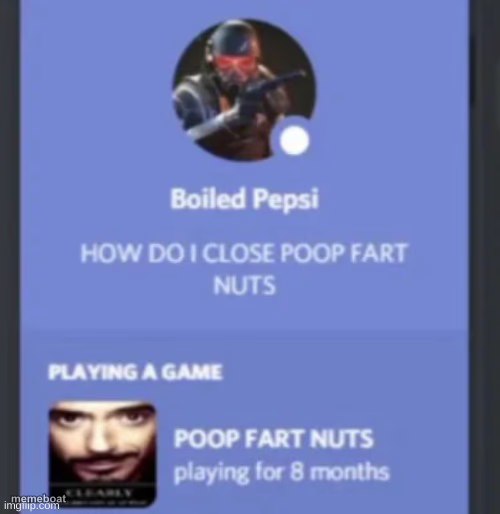
Fake Discord profile status stuck 'playing a game' with a panicked caption. Perfect for jokes about being trapped in an app or habit. Caption it free.
Blank How Do I Close Discord Game meme template
Download the blank How Do I Close Discord Game template to caption it yourself, or add your text right here in the editor above and download the finished meme.
When to use the How Do I Close Discord Game meme
- Realizing you've had a work tab open for 8 hours and have no idea how to tab out
- Doomscrolling an app you can't seem to close
- Stuck in a group chat/meeting notification loop with no exit
- Admitting you've been 'debugging' the same bug for way too long
How Do I Close Discord Game template facts
- Dimensions
- 500 × 514 px
- Format
- JPG
- Text boxes
- 4
- Added
- 2025
About the How Do I Close Discord Game meme template
This one's a screenshot of a Discord profile: a masked avatar, a confused status update, and a "Playing a Game" activity card showing hours logged on something ridiculous. It's the format people use whenever they want to admit they're stuck doing something they can't figure out how to stop.
Swap in your own game name and status line and it instantly becomes about whatever bad habit, app, or task has quietly eaten your week. Caption it, download it free, no login required.
Popular How Do I Close Discord Game caption ideas
STILL OPEN · HOW DO I MAKE IT STOP · TABGROUP · open since Monday
SEND HELP · I CAN'T FIND THE EXIT · GROUP PROJECT · playing for 3 weeks
WHERE IS THE X BUTTON · THIS APP HAS NO ESCAPE · SCROLLING · playing since birth
Templates similar to How Do I Close Discord Game







How Do I Close Discord Game meme FAQ
How do I make a How Do I Close Discord Game meme?
Scroll up to the How Do I Close Discord Game template, type your caption into the 4 text boxes in the editor above, adjust the font, size and color if you like, then click download. Your finished How Do I Close Discord Game meme is ready to share in seconds.
Can I use the How Do I Close Discord Game template for free?
Yes. The How Do I Close Discord Game template is completely free to use — no signup and no limits on how many memes you create or where you share them.
How do I download my How Do I Close Discord Game meme?
Click the download button under the editor once your How Do I Close Discord Game meme looks right. It saves straight to your device as a high-quality PNG or JPEG image.
How do I download the blank How Do I Close Discord Game template?
Use the "Download blank template" button in the blank How Do I Close Discord Game template section above to save the original, un-captioned image — handy if you'd rather caption it in another app or keep a copy.