
Glitchy_TheMemer's Announcement Template! Meme Generator
Create Your Glitchy_TheMemer's Announcement Template! Meme
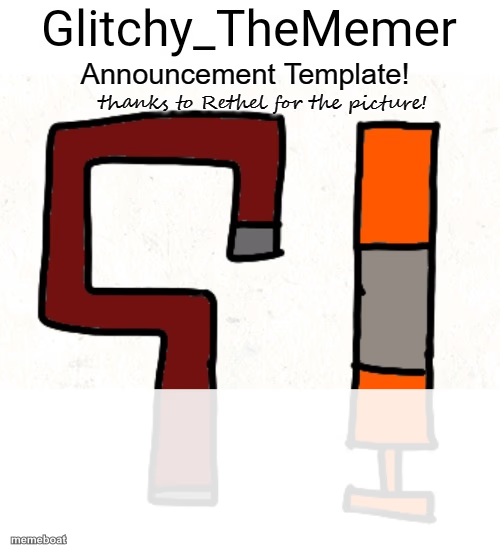
A hand-drawn announcement banner with abstract pipe-shaped doodles below a bold headline — a quirky blank canvas for any announcement joke. Caption and download free.
Blank Glitchy_TheMemer's Announcement Template! meme template
Download the blank Glitchy_TheMemer's Announcement Template! template to caption it yourself, or add your text right here in the editor above and download the finished meme.
When to use the Glitchy_TheMemer's Announcement Template! meme
- Making a fake 'big announcement' post for a group chat bit
- Parodying overly dramatic server or community announcements
- Writing a mock press release headline for something trivial
- Any joke that needs a bold all-caps declaration up top
Glitchy_TheMemer's Announcement Template! template facts
- Dimensions
- 500 × 556 px
- Format
- PNG
- Text boxes
- 1
- Added
- 2025
About the Glitchy_TheMemer's Announcement Template! meme template
A homemade-looking template: bold header space up top over two squiggly hand-drawn pipe shapes, one dark red and one orange. It's got that scrappy, community-made meme energy — clearly built for one purpose and reused a hundred different ways since.
Popular Glitchy_TheMemer's Announcement Template! caption ideas
...anyone remember me?
ATTENTION: someone ate the last slice
BREAKING: group chat has gone silent for 3 days
NOTICE: mandatory fun starts in 5 minutes
Templates similar to Glitchy_TheMemer's Announcement Template!



Glitchy_TheMemer's Announcement Template! meme FAQ
How do I make a Glitchy_TheMemer's Announcement Template! meme?
Scroll up to the Glitchy_TheMemer's Announcement Template! template, type your caption into the text box in the editor above, adjust the font, size and color if you like, then click download. Your finished Glitchy_TheMemer's Announcement Template! meme is ready to share in seconds.
Can I use the Glitchy_TheMemer's Announcement Template! template for free?
Yes. The Glitchy_TheMemer's Announcement Template! template is completely free to use — no signup and no limits on how many memes you create or where you share them.
How do I download my Glitchy_TheMemer's Announcement Template! meme?
Click the download button under the editor once your Glitchy_TheMemer's Announcement Template! meme looks right. It saves straight to your device as a high-quality PNG or JPEG image.
How do I download the blank Glitchy_TheMemer's Announcement Template! template?
Use the "Download blank template" button in the blank Glitchy_TheMemer's Announcement Template! template section above to save the original, un-captioned image — handy if you'd rather caption it in another app or keep a copy.