
Furry explaining meme Meme Generator
Create Your Furry explaining meme Meme
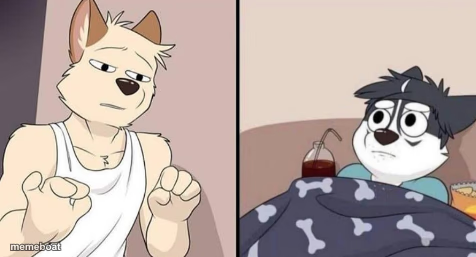
Two-panel cartoon: a confident furry character gesturing while explaining, next to a chubby character wrapped in a blanket looking confused. Free to caption and download.
Blank Furry explaining meme meme template
Download the blank Furry explaining meme template to caption it yourself, or add your text right here in the editor above and download the finished meme.
When to use the Furry explaining meme meme
- Explaining a wild fan theory nobody asked for
- Trying to justify a 3am impulse purchase
- Mansplaining something to a very unbothered friend
Furry explaining meme template facts
- Dimensions
- 476 × 257 px
- Format
- PNG
- Added
- 2025
About the Furry explaining meme meme template
Panel one: a tank-top-wearing furry throwing hands like he's about to drop the hottest take of the century. Panel two: his buddy, fully burrito'd in a bone-print blanket with a juice box, staring back like he has zero idea what's happening.
Popular Furry explaining meme caption ideas
Furry explaining meme
ME · MY MIND BE LIKE WHEN I HAVE TO BEG MY DAD TO GET A FURSUIT MASK
Templates similar to Furry explaining meme




Furry explaining meme meme FAQ
How do I make a Furry explaining meme meme?
Scroll up to the Furry explaining meme template, add your own text boxes in the editor above and type your captions, adjust the font, size and color if you like, then click download. Your finished Furry explaining meme meme is ready to share in seconds.
Can I use the Furry explaining meme template for free?
Yes. The Furry explaining meme template is completely free to use — no signup and no limits on how many memes you create or where you share them.
How do I download my Furry explaining meme meme?
Click the download button under the editor once your Furry explaining meme meme looks right. It saves straight to your device as a high-quality PNG or JPEG image.
How do I download the blank Furry explaining meme template?
Use the "Download blank template" button in the blank Furry explaining meme template section above to save the original, un-captioned image — handy if you'd rather caption it in another app or keep a copy.