
Anti-furry Meme Generator
Create Your Anti-furry Meme
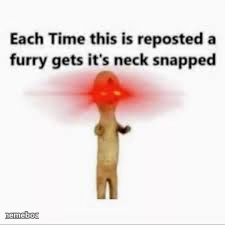
The classic 'each time this is reposted a furry gets its neck snapped' meme — the go-to copypasta bait image. Caption and download it free.
Blank Anti-furry meme template
Download the blank Anti-furry template to caption it yourself, or add your text right here in the editor above and download the finished meme.
When to use the Anti-furry meme
- Guilt-tripping followers into liking or sharing a post
- Swapping the noun for an inside joke among friends
- Parodying chain-mail / copypasta repost culture
- Making a mock threat over something trivial not being shared
Anti-furry template facts
- Dimensions
- 225 × 225 px
- Format
- PNG
- Added
- 2025
About the Anti-furry meme template
A wooden mannequin figure exploding with red light around its neck, paired with the infamous line that's launched a thousand reposts: threaten a furry's neck to farm engagement. It's absurdist copypasta energy at its finest — dead serious delivery, completely nonsensical stakes.
Use this for anything you want people to feel weirdly obligated to repost, share, or engage with against their better judgement. Swap 'furry' for literally any noun and the joke still works.
Popular Anti-furry caption ideas
DO THE REPOST · DO IT NOW
Templates similar to Anti-furry




Anti-furry meme FAQ
How do I make a Anti-furry meme?
Scroll up to the Anti-furry template, add your own text boxes in the editor above and type your captions, adjust the font, size and color if you like, then click download. Your finished Anti-furry meme is ready to share in seconds.
Can I use the Anti-furry template for free?
Yes. The Anti-furry template is completely free to use — no signup and no limits on how many memes you create or where you share them.
How do I download my Anti-furry meme?
Click the download button under the editor once your Anti-furry meme looks right. It saves straight to your device as a high-quality PNG or JPEG image.
How do I download the blank Anti-furry template?
Use the "Download blank template" button in the blank Anti-furry template section above to save the original, un-captioned image — handy if you'd rather caption it in another app or keep a copy.