
Frank_ Meme Generator
Create Your Frank_ Meme
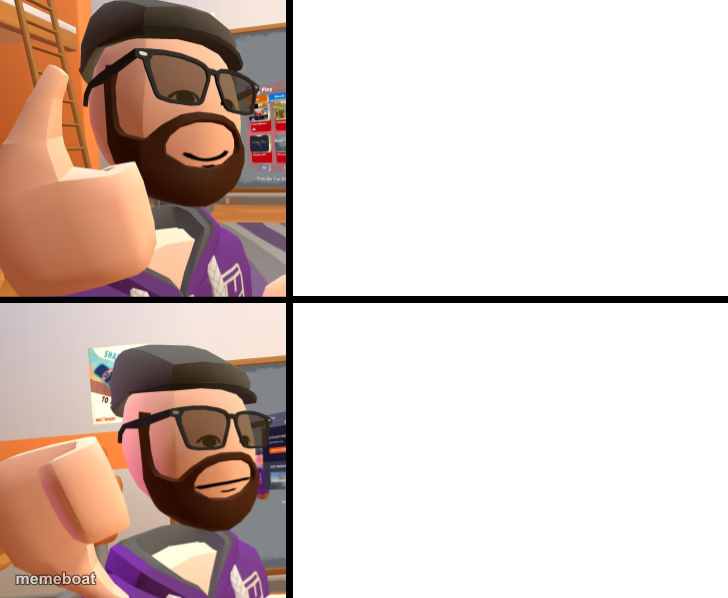
Bearded VR avatar in shades giving a thumbs up, top and bottom panel. Use it as a two-panel approval/rejection meme. Caption it free and download.
Blank Frank_ meme template
Download the blank Frank_ template to caption it yourself, or add your text right here in the editor above and download the finished meme.
When to use the Frank_ meme
- Reacting to a mid choice vs the objectively better choice
- Showing double the enthusiasm for something you really endorse
- VR/gaming in-jokes about avatar culture and thumbs-up reactions
Frank_ template facts
- Dimensions
- 728 × 598 px
- Format
- PNG
- Text boxes
- 2
- Added
- 2025
About the Frank_ meme template
A blocky 3D avatar with a beanie, sunglasses, and a scruffy beard gives a big thumbs up in two nearly identical panels, like a VR chat character stepping in to judge your life choices. It reads like a Rec Room or VRChat avatar screenshot, which makes it perfect for the classic two-tier comparison format.
Stack it top vs bottom to show the thing you approve of versus the thing that gets a harder thumbs up, or just spam the same reaction twice for emphasis. Caption it free on Memeboat and download instantly, no sign-up required.
Popular Frank_ caption ideas
me approving the free option · me approving the free option that also has no ads
giving this plan a thumbs up · giving this plan two thumbs up, figuratively
thumbs up for pizza · thumbs up for pizza with extra cheese



Frank_ meme FAQ
How do I make a Frank_ meme?
Scroll up to the Frank_ template, type your caption into the 2 text boxes in the editor above, adjust the font, size and color if you like, then click download. Your finished Frank_ meme is ready to share in seconds.
Can I use the Frank_ template for free?
Yes. The Frank_ template is completely free to use — no signup and no limits on how many memes you create or where you share them.
How do I download my Frank_ meme?
Click the download button under the editor once your Frank_ meme looks right. It saves straight to your device as a high-quality PNG or JPEG image.
How do I download the blank Frank_ template?
Use the "Download blank template" button in the blank Frank_ template section above to save the original, un-captioned image — handy if you'd rather caption it in another app or keep a copy.