
Finding a Gem Meme Generator
A cartoonish, pale-faced character with a round head, glasses, and a wide, gleeful smile looks intently at a large, glowing diamond.
Create Your Finding a Gem Meme
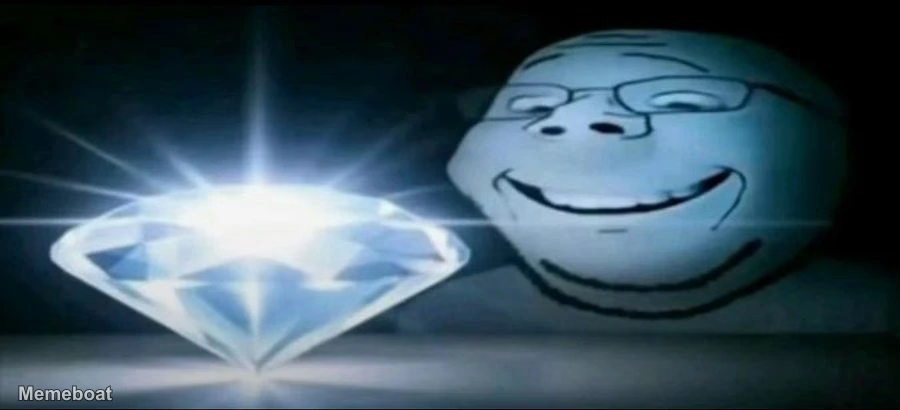
Blank Finding a Gem meme template
Download the blank Finding a Gem template to caption it yourself, or add your text right here in the editor above and download the finished meme.
Finding a Gem template facts
- Dimensions
- 900 × 410 px
- Format
- WEBP
- Text boxes
- 2
- Added
- 2026
About the Finding a Gem meme template
A cartoonish, pale-faced character with a round head, glasses, and a wide, gleeful smile looks intently at a large, glowing diamond. The diamond emits bright light and rays, set against a dark background, emphasizing its brilliance and the character's discovery. The image conveys the feeling of 'finding a gem'.
Popular Finding a Gem caption ideas
This is the kind of stuff dogs would post online if they were sentient · found a peanut m&m on my kitchen floor
found a peanut m&m on my kitchen floor
How it feels to find some cash in your pocket you forgot about
When you're losing and you notice your tank is going negative
When the other dps went negative and yk you lowkey didn't do enough
Kepa rest of the season DNP after today
do instituitions avoid hungarians?
Templates similar to Finding a Gem

Finding a Gem meme FAQ
How do I make a Finding a Gem meme?
Scroll up to the Finding a Gem template, type your caption into the 2 text boxes in the editor above, adjust the font, size and color if you like, then click download. Your finished Finding a Gem meme is ready to share in seconds.
Can I use the Finding a Gem template for free?
Yes. The Finding a Gem template is completely free to use — no signup and no limits on how many memes you create or where you share them.
How do I download my Finding a Gem meme?
Click the download button under the editor once your Finding a Gem meme looks right. It saves straight to your device as a high-quality PNG or JPEG image.
How do I download the blank Finding a Gem template?
Use the "Download blank template" button in the blank Finding a Gem template section above to save the original, un-captioned image — handy if you'd rather caption it in another app or keep a copy.