
Senku Smug Smirk Meme Generator
Create Your Senku Smug Smirk Meme
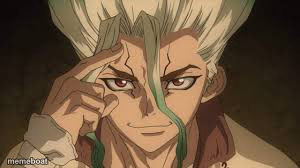
Senku from Dr. Stone smirking confidently with fingers to his temple, like he's about to explain a genius plan. Great for smug "I already figured it out" jokes. Free to caption.
Blank Senku Smug Smirk meme template
Download the blank Senku Smug Smirk template to caption it yourself, or add your text right here in the editor above and download the finished meme.
When to use the Senku Smug Smirk meme
- Reacting smugly after you called something correctly
- Explaining a plan nobody asked for but everyone needed
- That moment you realize you're the smartest person in the room
- Flexing knowledge in the most condescending way possible
Senku Smug Smirk template facts
- Featuring
- Senku Ishigami (Dr. Stone)
- Dimensions
- 300 × 168 px
- Format
- JPG
- Added
- 2025
About the Senku Smug Smirk meme template
Senku doing his signature smug genius face, fingers pressed to his temple like he's about to drop a 10-billion-percent plan on you. This is the face of someone who already knows the answer and is just waiting for everyone else to catch up.
Popular Senku Smug Smirk caption ideas
THE WALT DISNEY COMPANY MORE LIKE · THE RACIST DISNEY COMPANY
Templates similar to Senku Smug Smirk


Senku Smug Smirk meme FAQ
How do I make a Senku Smug Smirk meme?
Scroll up to the Senku Smug Smirk template, add your own text boxes in the editor above and type your captions, adjust the font, size and color if you like, then click download. Your finished Senku Smug Smirk meme is ready to share in seconds.
Can I use the Senku Smug Smirk template for free?
Yes. The Senku Smug Smirk template is completely free to use — no signup and no limits on how many memes you create or where you share them.
How do I download my Senku Smug Smirk meme?
Click the download button under the editor once your Senku Smug Smirk meme looks right. It saves straight to your device as a high-quality PNG or JPEG image.
How do I download the blank Senku Smug Smirk template?
Use the "Download blank template" button in the blank Senku Smug Smirk template section above to save the original, un-captioned image — handy if you'd rather caption it in another app or keep a copy.