
Smug Look Meme Generator
Create Your Smug Look Meme
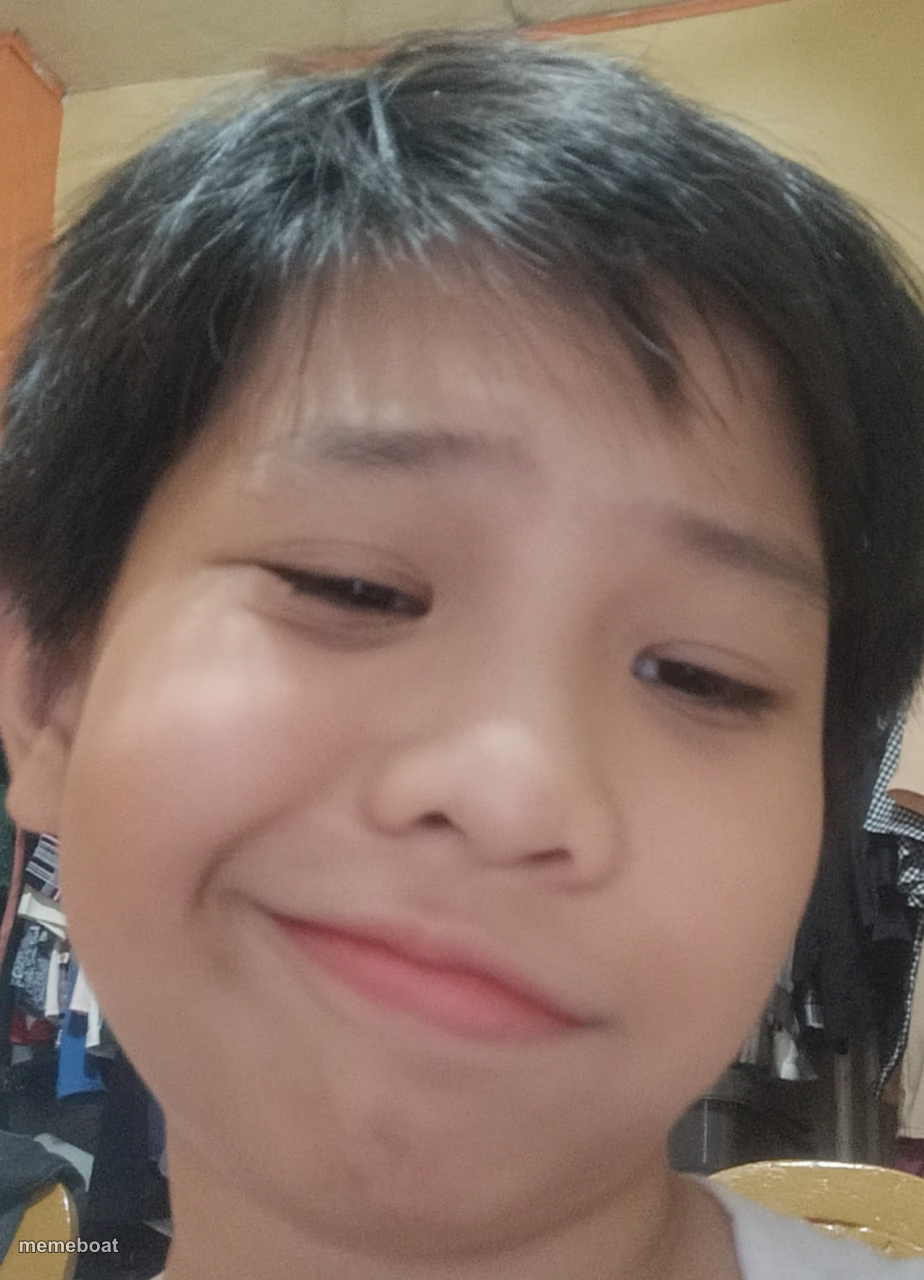
A kid giving a sly, knowing smirk straight into the camera like he's up to something. Great for playful mischief reactions. Caption and download free.
Blank Smug Look meme template
Download the blank Smug Look template to caption it yourself, or add your text right here in the editor above and download the finished meme.
When to use the Smug Look meme
- Confessing to a harmless prank with zero remorse
- Reacting smugly after successfully avoiding blame
- That look when you've got a secret and love it
- Responding to "did you do this?" with a smirk instead of words
Smug Look template facts
- Dimensions
- 924 × 1280 px
- Format
- JPG
- Text boxes
- 1
- Added
- 2025
About the Smug Look meme template
That look you give right before you do something you absolutely shouldn't — half innocent, half "I already did it and I'm not sorry." This close-up selfie has main-character mischief written all over it.
Use it for confessing to something petty, reacting smugly after getting away with a joke, or just captioning the energy of someone who knows exactly what they did.
Popular Smug Look caption ideas
ME WHEN · THE BOYS COME OVER FOR A SLEEPOVER
Me after muting the group chat and blaming my phone
When mom asks who ate the last cookie
Told them I was busy, was actually napping
Templates similar to Smug Look
Smug Look meme FAQ
How do I make a Smug Look meme?
Scroll up to the Smug Look template, type your caption into the text box in the editor above, adjust the font, size and color if you like, then click download. Your finished Smug Look meme is ready to share in seconds.
Can I use the Smug Look template for free?
Yes. The Smug Look template is completely free to use — no signup and no limits on how many memes you create or where you share them.
How do I download my Smug Look meme?
Click the download button under the editor once your Smug Look meme looks right. It saves straight to your device as a high-quality PNG or JPEG image.
How do I download the blank Smug Look template?
Use the "Download blank template" button in the blank Smug Look template section above to save the original, un-captioned image — handy if you'd rather caption it in another app or keep a copy.