
Discord Volume Meme Generator
Create Your Discord Volume Meme
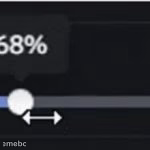
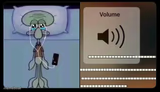
A volume slider stuck at 68% overlaid on a dark screen — perfect for jokes about effort, hype, or commitment stuck halfway. Caption it free and download.
Blank Discord Volume meme template
Download the blank Discord Volume template to caption it yourself, or add your text right here in the editor above and download the finished meme.
When to use the Discord Volume meme
- Describing how much effort you're putting into a task you don't care about
- Captioning your enthusiasm level for a Monday morning meeting
- Mocking someone who's only 'kind of' sorry or 'kind of' trying
Discord Volume template facts
- Dimensions
- 150 × 150 px
- Format
- JPG
- Text boxes
- 1
- Added
- 2025
About the Discord Volume meme template
It's just a volume slider frozen at 68%, hovering awkwardly between "barely trying" and "all in." That weirdly specific number is doing a lot of comedic work here — it's not 0%, it's not 100%, it's the most passive-aggressive amount of effort possible.
Use this for anything that's committed but not fully committed: your motivation on a Monday, how much you're paying attention in a meeting, or how loud you're willing to yell at a referee. It's the meme equivalent of a shrug with numbers attached.
Popular Discord Volume caption ideas
My motivation to go to the gym today
How loud I laugh at my boss's jokes
My effort level on this group project
Templates similar to Discord Volume




Discord Volume meme FAQ
How do I make a Discord Volume meme?
Scroll up to the Discord Volume template, type your caption into the text box in the editor above, adjust the font, size and color if you like, then click download. Your finished Discord Volume meme is ready to share in seconds.
Can I use the Discord Volume template for free?
Yes. The Discord Volume template is completely free to use — no signup and no limits on how many memes you create or where you share them.
How do I download my Discord Volume meme?
Click the download button under the editor once your Discord Volume meme looks right. It saves straight to your device as a high-quality PNG or JPEG image.
How do I download the blank Discord Volume template?
Use the "Download blank template" button in the blank Discord Volume template section above to save the original, un-captioned image — handy if you'd rather caption it in another app or keep a copy.