
Devious Gru Meme Generator
Create Your Devious Gru Meme
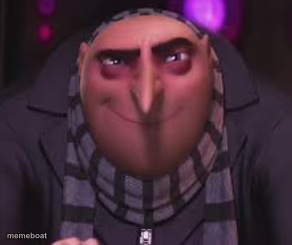
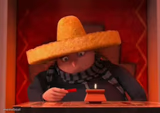
Gru from Despicable Me giving his signature sly, scheming close-up grin. The go-to face for 'I have a plan and it's not a good one.' Caption it free.
Blank Devious Gru meme template
Download the blank Devious Gru template to caption it yourself, or add your text right here in the editor above and download the finished meme.
When to use the Devious Gru meme
- When you 'accidentally' reply-all to expose the group chat drama
- Plotting to eat the last slice before anyone notices it's gone
- Setting an away message so you can nap during your shift
Devious Gru template facts
- Featuring
- Gru (Despicable Me)
- Dimensions
- 292 × 245 px
- Format
- PNG
- Text boxes
- 1
- Added
- 2025
About the Devious Gru meme template
Gru's face when he's cooking up something he definitely shouldn't be doing — that tight little smirk, the eyebrows doing all the talking. It's the universal expression for 'I know exactly what I'm about to do and I regret nothing.'
Great for petty plans, secretly messing with someone, or just any moment you're internally scheming while looking totally calm on the outside.
Popular Devious Gru caption ideas
REPLYING 'NO WORRIES' WHILE MENTALLY KEEPING SCORE
EATING THE LAST SLICE BEFORE ANYONE CLAIMS IT
SETTING 'BE RIGHT BACK' STATUS FOR A 45 MINUTE NAP
Templates similar to Devious Gru
Devious Gru meme FAQ
How do I make a Devious Gru meme?
Scroll up to the Devious Gru template, type your caption into the text box in the editor above, adjust the font, size and color if you like, then click download. Your finished Devious Gru meme is ready to share in seconds.
Can I use the Devious Gru template for free?
Yes. The Devious Gru template is completely free to use — no signup and no limits on how many memes you create or where you share them.
How do I download my Devious Gru meme?
Click the download button under the editor once your Devious Gru meme looks right. It saves straight to your device as a high-quality PNG or JPEG image.
How do I download the blank Devious Gru template?
Use the "Download blank template" button in the blank Devious Gru template section above to save the original, un-captioned image — handy if you'd rather caption it in another app or keep a copy.