
Gru's plan 5 panel Meme Generator
Create Your Gru's plan 5 panel Meme
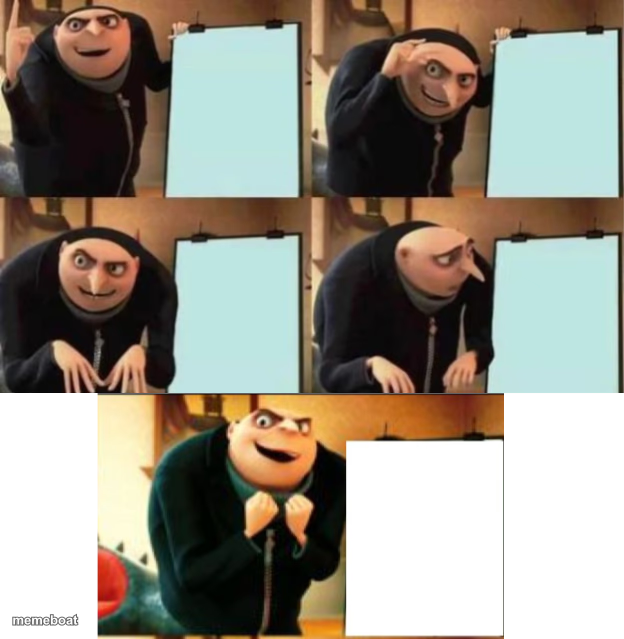
The classic Gru's Plan whiteboard meme extended to five panels for when the twist backfires twice as hard. Caption and download free.
Blank Gru's plan 5 panel meme template
Download the blank Gru's plan 5 panel template to caption it yourself, or add your text right here in the editor above and download the finished meme.
When to use the Gru's plan 5 panel meme
- A plan that sounds smart until the very last, very bad step
- Explaining a scheme that clearly backfires on the explainer
- Building up confidence right before the twist ruins everything
Gru's plan 5 panel template facts
- Featuring
- Gru (Despicable Me)
- Dimensions
- 624 × 639 px
- Format
- PNG
- Added
- 2025
About the Gru's plan 5 panel meme template
You know this one: Gru proudly presents his plan on a whiteboard, panel after panel, fully confident — until the final reveal shows the plan backfiring spectacularly on himself. This version stretches it to five panels, giving you one extra beat to really twist the knife before the disaster lands.
Use it for any plan that seems airtight right up until the part where it obviously wasn't. Confidently digging your own hole, one panel at a time.
Templates similar to Gru's plan 5 panel

Gru's plan 5 panel meme FAQ
How do I make a Gru's plan 5 panel meme?
Scroll up to the Gru's plan 5 panel template, add your own text boxes in the editor above and type your captions, adjust the font, size and color if you like, then click download. Your finished Gru's plan 5 panel meme is ready to share in seconds.
Can I use the Gru's plan 5 panel template for free?
Yes. The Gru's plan 5 panel template is completely free to use — no signup and no limits on how many memes you create or where you share them.
How do I download my Gru's plan 5 panel meme?
Click the download button under the editor once your Gru's plan 5 panel meme looks right. It saves straight to your device as a high-quality PNG or JPEG image.
How do I download the blank Gru's plan 5 panel template?
Use the "Download blank template" button in the blank Gru's plan 5 panel template section above to save the original, un-captioned image — handy if you'd rather caption it in another app or keep a copy.