Grim Reaper Meme Generator
Create Your Grim Reaper Meme
Also known as: Grim Reaper Scythe
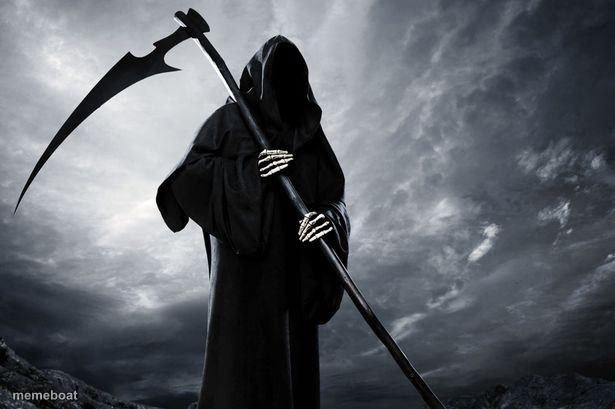
The Grim Reaper in a dark hooded robe holding a scythe against a stormy sky, fitting for dramatic, ominous, or dark-humor captions. Caption it free and download.
Blank Grim Reaper meme template
Download the blank Grim Reaper template to caption it yourself, or add your text right here in the editor above and download the finished meme.
When to use the Grim Reaper meme
- reacting to something doom-laden
- making a dark joke
- dramatizing an ending
Grim Reaper template facts
- Dimensions
- 615 × 409 px
- Format
- JPG
- Text boxes
- 2
- Added
- 2025
About the Grim Reaper meme template
A hooded figure in a black robe, its face hidden in shadow, holds a long scythe with skeletal hands under a heavy, stormy grey sky. The curved blade stretches out to the left above rocky ground. Used to react to something doom-laden, to make a dark joke or to dramatize an ending.
Popular Grim Reaper caption ideas
THE ENTIRE FUN STREAM AFTER SEEING THE MINECRAFT MOVIE · Me? I am Death.
Monday morning alarm · Coming for you
My motivation · Left the chat
Deadline day · Right on schedule
OH SHIT · MORE WORK COULDN'T EVEN GET A DAY OF REST
Templates similar to Grim Reaper


Grim Reaper meme FAQ
How do I make a Grim Reaper meme?
Scroll up to the Grim Reaper template, type your caption into the 2 text boxes in the editor above, adjust the font, size and color if you like, then click download. Your finished Grim Reaper meme is ready to share in seconds.
Can I use the Grim Reaper template for free?
Yes. The Grim Reaper template is completely free to use — no signup and no limits on how many memes you create or where you share them.
How do I download my Grim Reaper meme?
Click the download button under the editor once your Grim Reaper meme looks right. It saves straight to your device as a high-quality PNG or JPEG image.
How do I download the blank Grim Reaper template?
Use the "Download blank template" button in the blank Grim Reaper template section above to save the original, un-captioned image — handy if you'd rather caption it in another app or keep a copy.