
Suspicious House Mouse Meme Generator
Create Your Suspicious House Mouse Meme
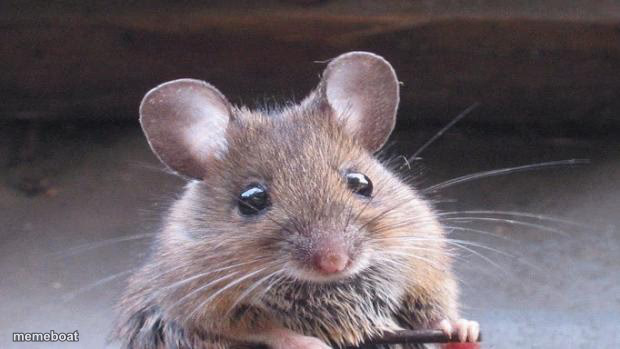
A close, wide-eyed mouse peeking out with big ears and a knowing little face — a great reaction image for 'up to no good' moments, free to caption.
Blank Suspicious House Mouse meme template
Download the blank Suspicious House Mouse template to caption it yourself, or add your text right here in the editor above and download the finished meme.
When to use the Suspicious House Mouse meme
- Captioning a pet or sibling who's clearly plotting something
- Reacting to someone who's being cute specifically to get away with it
- Describing yourself sneaking a snack you weren't supposed to have
Suspicious House Mouse template facts
- Dimensions
- 620 × 349 px
- Format
- JPG
- Added
- 2025
About the Suspicious House Mouse meme template
Look at those ears, look at those tiny black eyes — this mouse absolutely has a plan and it does not involve your permission. It's the perfect stand-in for anyone (or anything) caught being adorable and suspicious at the exact same time.
Popular Suspicious House Mouse caption ideas
MICE AND GIRAFFES · HAVE THE SAME NUMBER OF NECK BONES.
Templates similar to Suspicious House Mouse



Suspicious House Mouse meme FAQ
How do I make a Suspicious House Mouse meme?
Scroll up to the Suspicious House Mouse template, add your own text boxes in the editor above and type your captions, adjust the font, size and color if you like, then click download. Your finished Suspicious House Mouse meme is ready to share in seconds.
Can I use the Suspicious House Mouse template for free?
Yes. The Suspicious House Mouse template is completely free to use — no signup and no limits on how many memes you create or where you share them.
How do I download my Suspicious House Mouse meme?
Click the download button under the editor once your Suspicious House Mouse meme looks right. It saves straight to your device as a high-quality PNG or JPEG image.
How do I download the blank Suspicious House Mouse template?
Use the "Download blank template" button in the blank Suspicious House Mouse template section above to save the original, un-captioned image — handy if you'd rather caption it in another app or keep a copy.