
Google Microsoft Edge Download Meme Generator
Create Your Google Microsoft Edge Download Meme
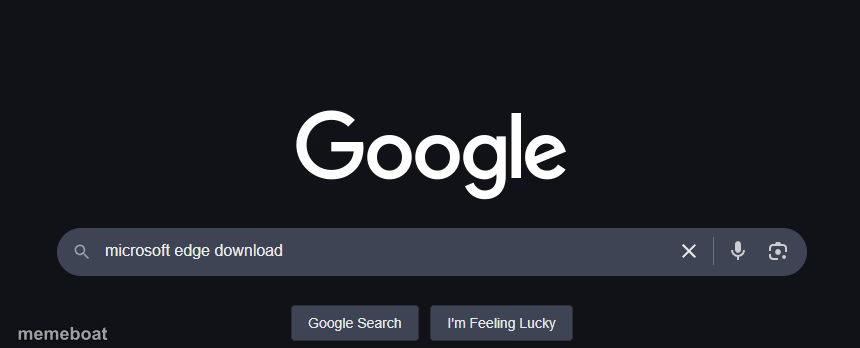
Dark-mode Google homepage with 'microsoft edge download' typed in the search bar — the classic browser-irony gag. Add your own caption and download free.
Blank Google Microsoft Edge Download meme template
Download the blank Google Microsoft Edge Download template to caption it yourself, or add your text right here in the editor above and download the finished meme.
When to use the Google Microsoft Edge Download meme
- Any 'why would you do it the hard way' or 'the irony is not lost on me' joke
- Poking fun at brand loyalty flip-flopping in general (not just browsers)
- Setting up a punchline about someone secretly using a thing they claim to hate
Google Microsoft Edge Download template facts
- Featuring
- Google Search for Microsoft Edge Download (Browser irony meme format (dark-mode Google homepage with 'microsoft edge downlo)
- Dimensions
- 860 × 348 px
- Format
- PNG
- Text boxes
- 2
- Added
- 2025
About the Google Microsoft Edge Download meme template
Everyone's done it: fire up Google to go find Microsoft Edge, because heaven forbid you actually use Edge to get there. This template captures that exact dark-mode search bar moment, typed query and all, ready for you to slap your own punchline underneath.
It's the perfect setup for any joke about doing the bare minimum, using the 'wrong tool' to get to the 'right tool', or just poking fun at browser loyalty wars. Add your text and it writes itself.
Popular Google Microsoft Edge Download caption ideas
POV: · PARALLEL UNIVERSE
Me installing a rival product's app just to leave a 1-star review · Peak dedication
Step 1: open the browser you swear you'll never use again · Step 2: use it to download the one you actually like
That one coworker who trash-talks the competitor all day · then quietly googles their product at 5pm
Templates similar to Google Microsoft Edge Download

Google Microsoft Edge Download meme FAQ
How do I make a Google Microsoft Edge Download meme?
Scroll up to the Google Microsoft Edge Download template, type your caption into the 2 text boxes in the editor above, adjust the font, size and color if you like, then click download. Your finished Google Microsoft Edge Download meme is ready to share in seconds.
Can I use the Google Microsoft Edge Download template for free?
Yes. The Google Microsoft Edge Download template is completely free to use — no signup and no limits on how many memes you create or where you share them.
How do I download my Google Microsoft Edge Download meme?
Click the download button under the editor once your Google Microsoft Edge Download meme looks right. It saves straight to your device as a high-quality PNG or JPEG image.
How do I download the blank Google Microsoft Edge Download template?
Use the "Download blank template" button in the blank Google Microsoft Edge Download template section above to save the original, un-captioned image — handy if you'd rather caption it in another app or keep a copy.