
Did you mean? Meme Generator
Create Your Did you mean? Meme
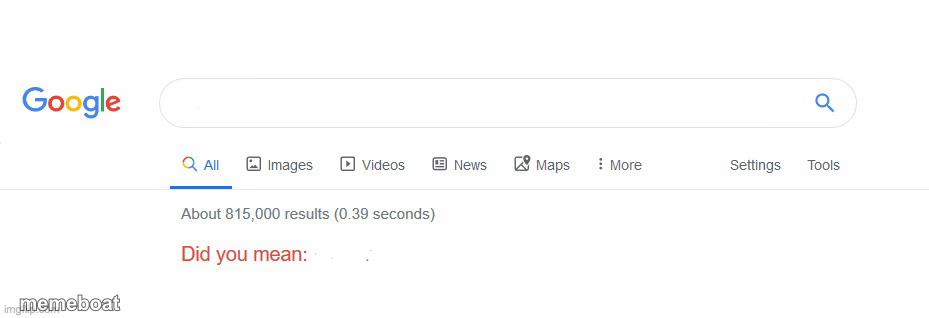
Also known as: Google Search Correction · Google Search Page
A Google search results page with a red Did You Mean correction, ideal for gently mocking typos, correcting assumptions, or setting up a snarky comparison. Caption and download free.
Blank Did you mean? meme template
Download the blank Did you mean? template to caption it yourself, or add your text right here in the editor above and download the finished meme.
When to use the Did you mean? meme
- correcting a mistake
- mocking a typo
- setting up a comparison
- sarcastic suggestion
Did you mean? template facts
- Dimensions
- 929 × 318 px
- Format
- JPG
- Text boxes
- 2
- Added
- 2025
About the Did you mean? meme template
The "Did You Mean?" meme template originates from the familiar Google Search feature that suggests alternative queries when a user mistypes a search term. This meme taps into internet culture by humorously highlighting misunderstandings, typos, or unexpected corrections, turning a simple search engine prompt into a viral phenomenon. Since its rise in popularity around the mid-2010s on platforms like Reddit and Twitter, the "Did You Mean?" meme has become a staple in meme culture, symbolizing relatable moments of confusion and surprise in everyday digital interactions.
Knowing how to use the "Did You Mean?" meme template effectively can elevate your social media content with funny reactions and relatable moments. Perfect for posts that play on misunderstandings, autocorrect fails, or ironic twists, this template works well on Instagram, Facebook, Twitter, and TikTok. Whether you want to highlight a funny typo or create a clever alternative scenario, learning how to make a "Did You Mean?" meme allows you to connect with your audience through humor and shared digital experiences. This meme is ideal for anyone looking to add a witty spin to their posts and engage followers with entertaining, shareable content.
The "Did You Mean?" meme remains popular because it’s easy to customize and instantly relatable, making it a top choice for meme makers everywhere. With our free online generator, you can create, personalize, and generate your own "Did You Mean?" memes quickly—no design skills needed. Its viral potential is huge, as these memes encourage social sharing and laughter across social media platforms. Start making your own "Did You Mean?" memes now to join millions of users creating trending, funny content that spreads fast and keeps your audience entertained and engaged.
Popular Did you mean? caption ideas
Ouch..
How to get a girlfriend · How to not be you
Vrey Relatabel
I think I have Dyslexia · I thikn I haev Dyselxia
Did you mean?
How to make the teacher punish the bully · How to stop dreaming
Even google knows this one’s impossible
how to seperate my two lego pieces · how to fight god
Did you mean?
Lunchly · Processed poison
thanks, google
how to admit to your crush that you like her · how to get rejected
That kid be like
How to win always in every game · Go touch grass
Do you know cringe
Skibidi toilet · cringe
Did you mean?
Encanto ship art · Nearest therapist
Oh my gosh google just get me some therapy
I hate being currected · I hate being corrected
Templates similar to Did you mean?


Did you mean? meme FAQ
How do I make a Did you mean? meme?
Scroll up to the Did you mean? template, type your caption into the 2 text boxes in the editor above, adjust the font, size and color if you like, then click download. Your finished Did you mean? meme is ready to share in seconds.
Can I use the Did you mean? template for free?
Yes. The Did you mean? template is completely free to use — no signup and no limits on how many memes you create or where you share them.
How do I download my Did you mean? meme?
Click the download button under the editor once your Did you mean? meme looks right. It saves straight to your device as a high-quality PNG or JPEG image.
How do I download the blank Did you mean? template?
Use the "Download blank template" button in the blank Did you mean? template section above to save the original, un-captioned image — handy if you'd rather caption it in another app or keep a copy.