
Camouflage lol Meme Generator
Create Your Camouflage lol Meme
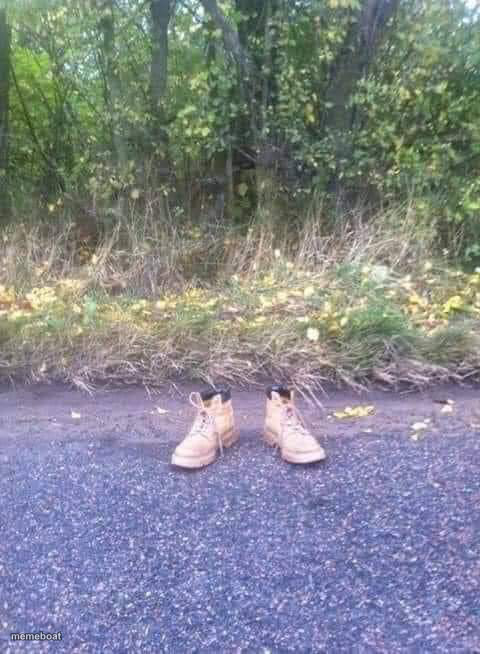
A pair of empty boots left standing in the middle of a road — perfect for eerie disappearances, ghosted plans, or 'and then he was never seen again' jokes. Free to caption.
Blank Camouflage lol meme template
Download the blank Camouflage lol template to caption it yourself, or add your text right here in the editor above and download the finished meme.
When to use the Camouflage lol meme
- When someone ghosts you mid-conversation
- That coworker who 'stepped out for five minutes' an hour ago
- Describing someone who vanished after being asked to do a chore
- Reacting to a friend who left the group project without warning
Camouflage lol template facts
- Dimensions
- 480 × 654 px
- Format
- JPG
- Text boxes
- 1
- Added
- 2025
About the Camouflage lol meme template
Two work boots standing perfectly upright on an empty road, nobody in sight. No struggle, no explanation, just boots. It's got that unsettling 'left this mortal plane mid-stride' energy that makes for great mystery or exit jokes.
Popular Camouflage lol caption ideas
Me the second I hear 'can someone help move this couch'
Him after I asked who ate the last slice
What's left of my motivation on a Monday
Templates similar to Camouflage lol


Camouflage lol meme FAQ
How do I make a Camouflage lol meme?
Scroll up to the Camouflage lol template, type your caption into the text box in the editor above, adjust the font, size and color if you like, then click download. Your finished Camouflage lol meme is ready to share in seconds.
Can I use the Camouflage lol template for free?
Yes. The Camouflage lol template is completely free to use — no signup and no limits on how many memes you create or where you share them.
How do I download my Camouflage lol meme?
Click the download button under the editor once your Camouflage lol meme looks right. It saves straight to your device as a high-quality PNG or JPEG image.
How do I download the blank Camouflage lol template?
Use the "Download blank template" button in the blank Camouflage lol template section above to save the original, un-captioned image — handy if you'd rather caption it in another app or keep a copy.