
Deku Electrocuted Meme Generator
Create Your Deku Electrocuted Meme
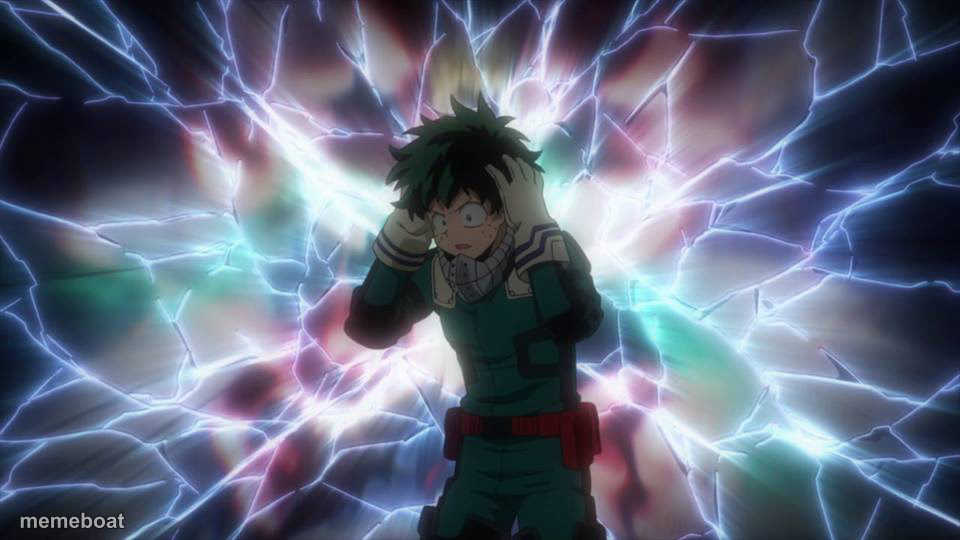
Deku frying in a burst of electricity, mid mental-breakdown realization. Caption the panic and download this anime meme free.
Blank Deku Electrocuted meme template
Download the blank Deku Electrocuted template to caption it yourself, or add your text right here in the editor above and download the finished meme.
When to use the Deku Electrocuted meme
- The instant you remember an assignment was due an hour ago
- Realizing mid-conversation you already told this same story
- Finding out the 'reply all' email actually went to everyone
Deku Electrocuted template facts
- Featuring
- Izuku Midoriya (Deku) (My Hero Academia)
- Dimensions
- 960 × 540 px
- Format
- JPG
- Added
- 2025
About the Deku Electrocuted meme template
Deku standing in the middle of a full electric meltdown, hands on his head like his brain just short-circuited from a sudden realization. It's peak anime overreaction energy — the visual equivalent of your whole nervous system going 'oh no.'
Great for that split second when a bad realization hits, when the deadline you forgot suddenly remembers you, or any 'wait... WHAT' moment that deserves lightning bolts.
Templates similar to Deku Electrocuted





Deku Electrocuted meme FAQ
How do I make a Deku Electrocuted meme?
Scroll up to the Deku Electrocuted template, add your own text boxes in the editor above and type your captions, adjust the font, size and color if you like, then click download. Your finished Deku Electrocuted meme is ready to share in seconds.
Can I use the Deku Electrocuted template for free?
Yes. The Deku Electrocuted template is completely free to use — no signup and no limits on how many memes you create or where you share them.
How do I download my Deku Electrocuted meme?
Click the download button under the editor once your Deku Electrocuted meme looks right. It saves straight to your device as a high-quality PNG or JPEG image.
How do I download the blank Deku Electrocuted template?
Use the "Download blank template" button in the blank Deku Electrocuted template section above to save the original, un-captioned image — handy if you'd rather caption it in another app or keep a copy.