
Deku Intense Stare Meme Generator
Create Your Deku Intense Stare Meme

Deku from My Hero Academia with a dead-serious, intense close-up stare. Perfect for that moment you snap out of chill mode into full focus. Free to caption.
Blank Deku Intense Stare meme template
Download the blank Deku Intense Stare template to caption it yourself, or add your text right here in the editor above and download the finished meme.
When to use the Deku Intense Stare meme
- Switching from relaxed weekend mode to Monday grind mode instantly
- When someone insults your favorite anime and you go quiet
Deku Intense Stare template facts
- Featuring
- Izuku Midoriya (Deku) (My Hero Academia)
- Dimensions
- 220 × 211 px
- Format
- JPG
- Text boxes
- 1
- Added
- 2025
About the Deku Intense Stare meme template
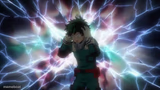
Deku's face zoomed in tight with a dark, painterly filter over it, giving off pure 'I just switched from soft boy to full combat mode' energy. Green hair everywhere, eyes locked, jaw set — this is not a drill.
Popular Deku Intense Stare caption ideas
Me hearing my alarm on a day off by accident
When they say the group project is due tomorrow, not next week
That face when someone says 'One Piece is better'
Templates similar to Deku Intense Stare





Deku Intense Stare meme FAQ
How do I make a Deku Intense Stare meme?
Scroll up to the Deku Intense Stare template, type your caption into the text box in the editor above, adjust the font, size and color if you like, then click download. Your finished Deku Intense Stare meme is ready to share in seconds.
Can I use the Deku Intense Stare template for free?
Yes. The Deku Intense Stare template is completely free to use — no signup and no limits on how many memes you create or where you share them.
How do I download my Deku Intense Stare meme?
Click the download button under the editor once your Deku Intense Stare meme looks right. It saves straight to your device as a high-quality PNG or JPEG image.
How do I download the blank Deku Intense Stare template?
Use the "Download blank template" button in the blank Deku Intense Stare template section above to save the original, un-captioned image — handy if you'd rather caption it in another app or keep a copy.