
Dark Brooding Batman Meme Generator
Create Your Dark Brooding Batman Meme

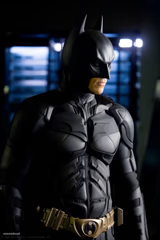
Close-up of a shadowy, battle-worn Batman looking off intensely. Perfect for dramatic, brooding, or over-serious reaction memes. Caption and download free.
Blank Dark Brooding Batman meme template
Download the blank Dark Brooding Batman template to caption it yourself, or add your text right here in the editor above and download the finished meme.
When to use the Dark Brooding Batman meme
- being overly dramatic
- brooding over small problems
- intense serious mood
Dark Brooding Batman template facts
- Dimensions
- 995 × 1280 px
- Format
- JPG
- Text boxes
- 2
- Added
- 2025
About the Dark Brooding Batman meme template
Batman, the DC Comics hero, stands in profile with his head bowed and the pointed ears of his cowl rising against a dark brown background. Harsh light falls across his jaw and brow, leaving his grim face in shadow. Used when someone broods over a small problem and treats it as a serious crisis.
Popular Dark Brooding Batman caption ideas
Me thinking about · that reply I never sent
When someone says · 'it's just a typo'
Contemplating life · over spilled coffee
Templates similar to Dark Brooding Batman




Dark Brooding Batman meme FAQ
How do I make a Dark Brooding Batman meme?
Scroll up to the Dark Brooding Batman template, type your caption into the 2 text boxes in the editor above, adjust the font, size and color if you like, then click download. Your finished Dark Brooding Batman meme is ready to share in seconds.
Can I use the Dark Brooding Batman template for free?
Yes. The Dark Brooding Batman template is completely free to use — no signup and no limits on how many memes you create or where you share them.
How do I download my Dark Brooding Batman meme?
Click the download button under the editor once your Dark Brooding Batman meme looks right. It saves straight to your device as a high-quality PNG or JPEG image.
How do I download the blank Dark Brooding Batman template?
Use the "Download blank template" button in the blank Dark Brooding Batman template section above to save the original, un-captioned image — handy if you'd rather caption it in another app or keep a copy.