
Flash The Sloth Meme Generator
Create Your Flash The Sloth Meme
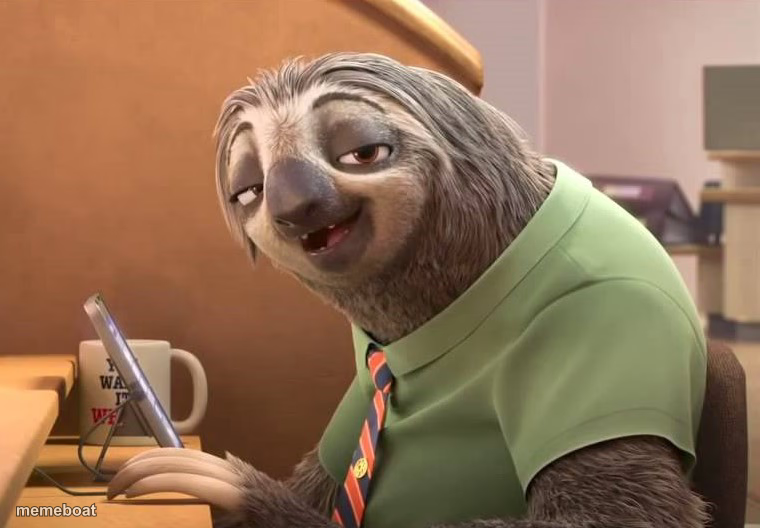
Flash the sloth from Zootopia grins at his computer, radiating slow-motion smugness — ideal for jokes about taking forever to do anything. Free to caption.
Blank Flash The Sloth meme template
Download the blank Flash The Sloth template to caption it yourself, or add your text right here in the editor above and download the finished meme.
When to use the Flash The Sloth meme
- When IT says your ticket is 'being looked into'
- Replying to a text three days later like it's normal
- Watching the loading bar not move at all
Flash The Sloth template facts
- Featuring
- Flash (Zootopia)
- Dimensions
- 760 × 528 px
- Format
- JPG
- Added
- 2025
About the Flash The Sloth meme template
Flash is at his desk, computer glowing, tie perfectly straight, and he is in absolutely no hurry whatsoever. That grin says he knows you're waiting on him and he simply does not care — legendary slow-worker energy from the DMV scene that broke the internet.
Use it for anything involving glacial response times: slow coworkers, slow Wi-Fi, slow replies, or your own smug refusal to rush. The joke writes itself the moment you add 'processing...' energy to literally any situation.
Templates similar to Flash The Sloth




Flash The Sloth meme FAQ
How do I make a Flash The Sloth meme?
Scroll up to the Flash The Sloth template, add your own text boxes in the editor above and type your captions, adjust the font, size and color if you like, then click download. Your finished Flash The Sloth meme is ready to share in seconds.
Can I use the Flash The Sloth template for free?
Yes. The Flash The Sloth template is completely free to use — no signup and no limits on how many memes you create or where you share them.
How do I download my Flash The Sloth meme?
Click the download button under the editor once your Flash The Sloth meme looks right. It saves straight to your device as a high-quality PNG or JPEG image.
How do I download the blank Flash The Sloth template?
Use the "Download blank template" button in the blank Flash The Sloth template section above to save the original, un-captioned image — handy if you'd rather caption it in another app or keep a copy.