
zhongli Meme Generator
Create Your zhongli Meme
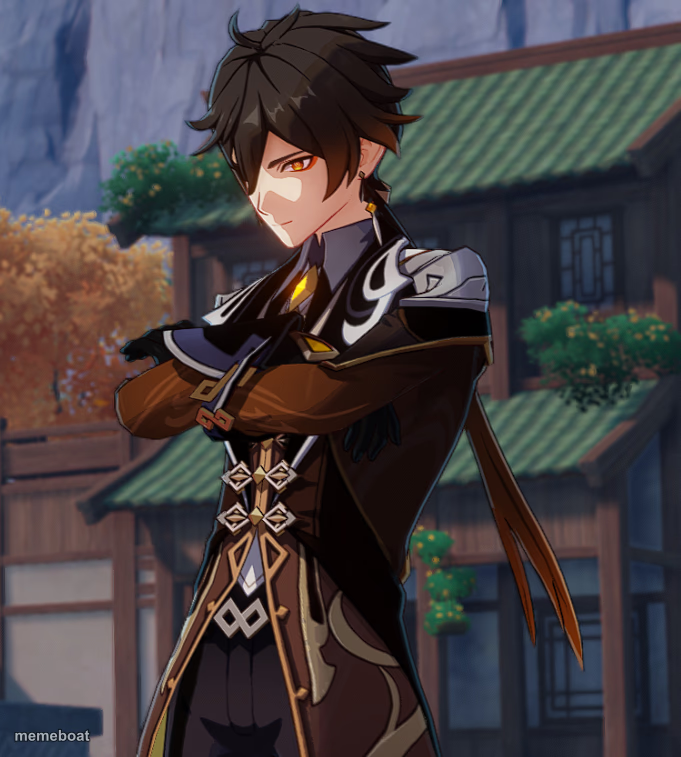
Zhongli stands with crossed arms and a knowing smirk — perfect for smug confidence, 'I told you so' moments, or effortless main-character energy. Caption free.
Blank zhongli meme template
Download the blank zhongli template to caption it yourself, or add your text right here in the editor above and download the finished meme.
When to use the zhongli meme
- Calmly proving someone wrong with one sentence
- Looking unbothered while everyone else is losing it
- Dropping a fun fact nobody asked for but everyone needed
- Winning without even trying
zhongli template facts
- Featuring
- Zhongli (Genshin Impact)
- Dimensions
- 681 × 757 px
- Format
- PNG
- Text boxes
- 2
- Added
- 2025
About the zhongli meme template
Zhongli, the ever-composed geo archon from Genshin Impact, stands arms crossed with the calm smirk of someone who already knows how this ends. Classic understated-flex pose.
Use it whenever you (or your character) need to radiate quiet confidence — winning an argument without raising your voice, dropping a mic-drop fact, or just looking effortlessly put-together while everyone else panics.
Popular zhongli caption ideas
WHEN YOU CALLED IT MONTHS AGO · AND THEY FINALLY ADMIT IT
ARRIVING FASHIONABLY LATE · AND SOMEHOW STILL FIRST



zhongli meme FAQ
How do I make a zhongli meme?
Scroll up to the zhongli template, type your caption into the 2 text boxes in the editor above, adjust the font, size and color if you like, then click download. Your finished zhongli meme is ready to share in seconds.
Can I use the zhongli template for free?
Yes. The zhongli template is completely free to use — no signup and no limits on how many memes you create or where you share them.
How do I download my zhongli meme?
Click the download button under the editor once your zhongli meme looks right. It saves straight to your device as a high-quality PNG or JPEG image.
How do I download the blank zhongli template?
Use the "Download blank template" button in the blank zhongli template section above to save the original, un-captioned image — handy if you'd rather caption it in another app or keep a copy.