
YouTube Poop FC Logo Meme Generator
Create Your YouTube Poop FC Logo Meme
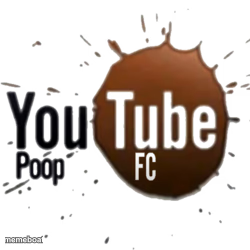
The splatter-style 'YouTube Poop FC' logo, internet-culture in-joke energy. Caption it and download free for your next chaotic meme.
Blank YouTube Poop FC Logo meme template
Download the blank YouTube Poop FC Logo template to caption it yourself, or add your text right here in the editor above and download the finished meme.
When to use the YouTube Poop FC Logo meme
- Anything trying to look official but is secretly a joke
- Throwback posts about early internet meme culture
- Fake sports team branding for chaotic group chats
- Labeling nonsense as if it were a real organization
YouTube Poop FC Logo template facts
- Dimensions
- 250 × 250 px
- Format
- PNG
- Added
- 2025
About the YouTube Poop FC Logo meme template
A mock sports-club logo built entirely around the classic YouTube Poop community joke — splash graphic, bold lettering, and just enough 'FC' energy to look almost legit.
Use it for anything absurd that's trying to pass itself off as official, or tribute posts to the golden age of internet remix chaos.
Popular YouTube Poop FC Logo caption ideas
Real
THIS WAS GEN-Z'S · SKIBIDI TOILET
Templates similar to YouTube Poop FC Logo





YouTube Poop FC Logo meme FAQ
How do I make a YouTube Poop FC Logo meme?
Scroll up to the YouTube Poop FC Logo template, add your own text boxes in the editor above and type your captions, adjust the font, size and color if you like, then click download. Your finished YouTube Poop FC Logo meme is ready to share in seconds.
Can I use the YouTube Poop FC Logo template for free?
Yes. The YouTube Poop FC Logo template is completely free to use — no signup and no limits on how many memes you create or where you share them.
How do I download my YouTube Poop FC Logo meme?
Click the download button under the editor once your YouTube Poop FC Logo meme looks right. It saves straight to your device as a high-quality PNG or JPEG image.
How do I download the blank YouTube Poop FC Logo template?
Use the "Download blank template" button in the blank YouTube Poop FC Logo template section above to save the original, un-captioned image — handy if you'd rather caption it in another app or keep a copy.