
But Yes Jimmy O Yang Meme Generator
Create Your But Yes Jimmy O Yang Meme
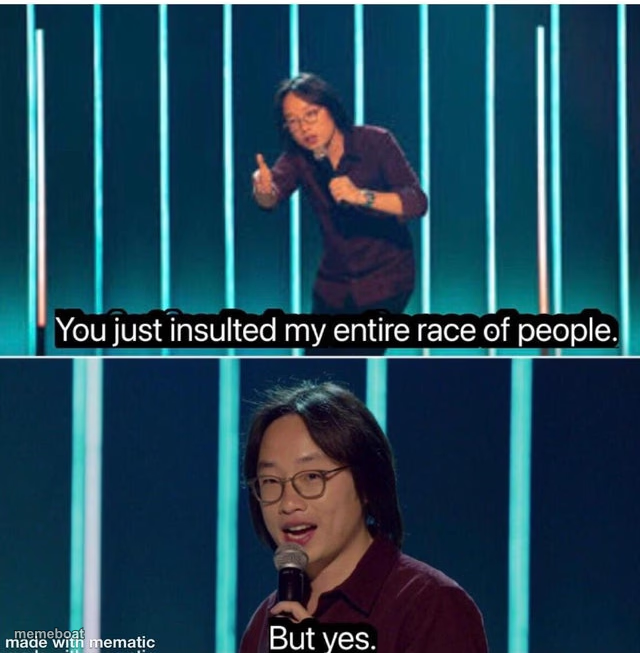
Jimmy O. Yang on stage accusing the crowd of insulting his race, then calmly admitting "but yes" in the next panel. Caption it and download free.
Blank But Yes Jimmy O Yang meme template
Download the blank But Yes Jimmy O Yang template to caption it yourself, or add your text right here in the editor above and download the finished meme.
When to use the But Yes Jimmy O Yang meme
- Admitting a stereotype is true after acting offended
- Calling out a rude comment then agreeing with it anyway
- Owning up to something after a fake defensive reaction
- Confirming an insult was actually accurate
But Yes Jimmy O Yang template facts
- Featuring
- Jimmy O. Yang (stand-up special)
- Dimensions
- 640 × 653 px
- Format
- PNG
- Added
- 2025
About the But Yes Jimmy O Yang meme template
Top panel: he's calling you out, pointing fingers, fully offended on behalf of his entire race. Bottom panel: same guy, calm as anything, just... agreeing with you. "But yes." It's the perfect setup-and-cave format for admitting an ugly truth after pretending to be mad about it.
Templates similar to But Yes Jimmy O Yang


But Yes Jimmy O Yang meme FAQ
How do I make a But Yes Jimmy O Yang meme?
Scroll up to the But Yes Jimmy O Yang template, add your own text boxes in the editor above and type your captions, adjust the font, size and color if you like, then click download. Your finished But Yes Jimmy O Yang meme is ready to share in seconds.
Can I use the But Yes Jimmy O Yang template for free?
Yes. The But Yes Jimmy O Yang template is completely free to use — no signup and no limits on how many memes you create or where you share them.
How do I download my But Yes Jimmy O Yang meme?
Click the download button under the editor once your But Yes Jimmy O Yang meme looks right. It saves straight to your device as a high-quality PNG or JPEG image.
How do I download the blank But Yes Jimmy O Yang template?
Use the "Download blank template" button in the blank But Yes Jimmy O Yang template section above to save the original, un-captioned image — handy if you'd rather caption it in another app or keep a copy.