
Bill O'Reilly Aliens Meme Generator
Create Your Bill O'Reilly Aliens Meme
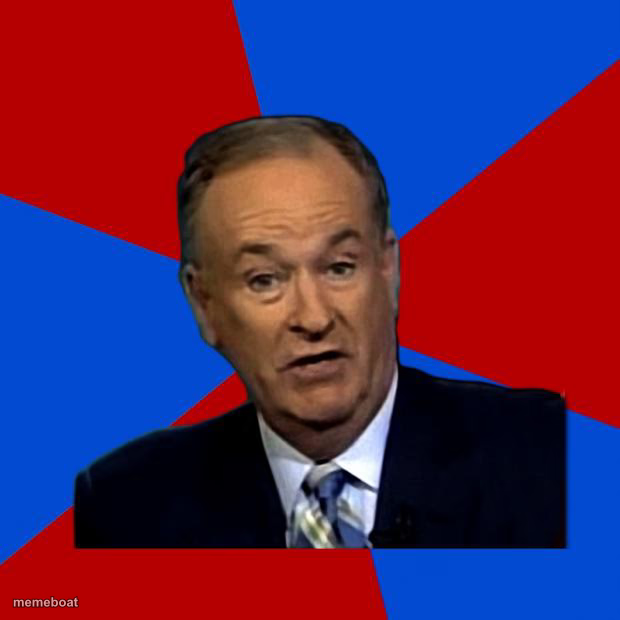
Bill O'Reilly in front of a jagged red-and-blue background, mid-sentence like he's about to explain something nobody can debunk. Free to caption.
Blank Bill O'Reilly Aliens meme template
Download the blank Bill O'Reilly Aliens template to caption it yourself, or add your text right here in the editor above and download the finished meme.
When to use the Bill O'Reilly Aliens meme
- Explaining something with zero evidence but total confidence
- "Well, actually..." energy for a bad take
- Reacting to an unexplainable coincidence
- Confidently wrong about basic facts
Bill O'Reilly Aliens template facts
- Featuring
- Bill O'Reilly (The O'Reilly Factor)
- Dimensions
- 620 × 620 px
- Format
- JPG
- Added
- 2025
About the Bill O'Reilly Aliens meme template
Bill O'Reilly, frozen mid-thought against a chaotic red-and-blue starburst background, forever associated with confidently saying things that make absolutely no scientific sense.
Use it for pseudo-scientific nonsense, confidently wrong takes, or anytime someone treats a mystery as unsolvable instead of just googling it.
Templates similar to Bill O'Reilly Aliens


Bill O'Reilly Aliens meme FAQ
How do I make a Bill O'Reilly Aliens meme?
Scroll up to the Bill O'Reilly Aliens template, add your own text boxes in the editor above and type your captions, adjust the font, size and color if you like, then click download. Your finished Bill O'Reilly Aliens meme is ready to share in seconds.
Can I use the Bill O'Reilly Aliens template for free?
Yes. The Bill O'Reilly Aliens template is completely free to use — no signup and no limits on how many memes you create or where you share them.
How do I download my Bill O'Reilly Aliens meme?
Click the download button under the editor once your Bill O'Reilly Aliens meme looks right. It saves straight to your device as a high-quality PNG or JPEG image.
How do I download the blank Bill O'Reilly Aliens template?
Use the "Download blank template" button in the blank Bill O'Reilly Aliens template section above to save the original, un-captioned image — handy if you'd rather caption it in another app or keep a copy.