
YOU AND WHAT ARMY? Meme Generator
Create Your YOU AND WHAT ARMY? Meme
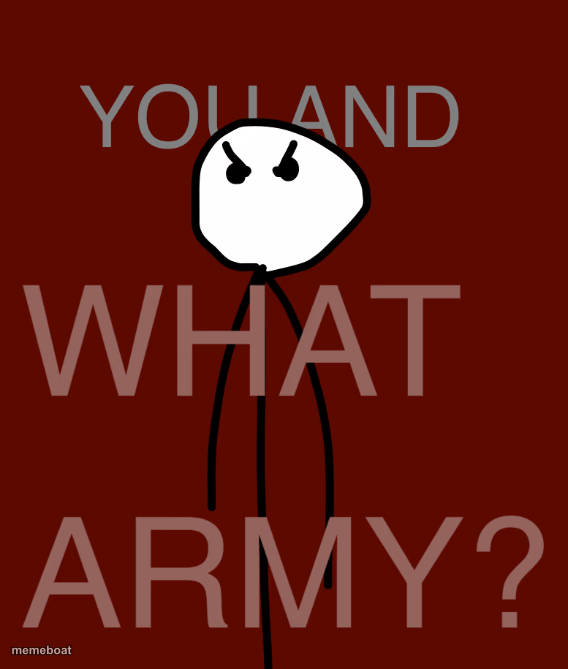
An angry stick figure asks 'You and what army?' — the go-to template for empty threats and all-talk bravado. Caption and download free.
Blank YOU AND WHAT ARMY? meme template
Download the blank YOU AND WHAT ARMY? template to caption it yourself, or add your text right here in the editor above and download the finished meme.
When to use the YOU AND WHAT ARMY? meme
- Calling out an empty threat from someone with zero backup
- Responding to a friend who says they'll 'fight' something they clearly can't
- Any bravado moment that's all talk and no plan
YOU AND WHAT ARMY? template facts
- Dimensions
- 568 × 669 px
- Format
- PNG
- Text boxes
- 1
- Added
- 2025
About the YOU AND WHAT ARMY? meme template
A single angry stick figure squares up against giant bold text daring you to bring a fight you clearly can't win. It's the meme equivalent of someone puffing their chest out with absolutely no backup behind them.
Popular YOU AND WHAT ARMY? caption ideas
YOU AND WHAT ARMY?
MY LANDLORD THREATENING TO EVICT ME AND WHAT ARMY?
MONDAY MORNING TRYING TO RUIN MY WEEK AND WHAT ARMY?
Templates similar to YOU AND WHAT ARMY?


YOU AND WHAT ARMY? meme FAQ
How do I make a YOU AND WHAT ARMY? meme?
Scroll up to the YOU AND WHAT ARMY? template, type your caption into the text box in the editor above, adjust the font, size and color if you like, then click download. Your finished YOU AND WHAT ARMY? meme is ready to share in seconds.
Can I use the YOU AND WHAT ARMY? template for free?
Yes. The YOU AND WHAT ARMY? template is completely free to use — no signup and no limits on how many memes you create or where you share them.
How do I download my YOU AND WHAT ARMY? meme?
Click the download button under the editor once your YOU AND WHAT ARMY? meme looks right. It saves straight to your device as a high-quality PNG or JPEG image.
How do I download the blank YOU AND WHAT ARMY? template?
Use the "Download blank template" button in the blank YOU AND WHAT ARMY? template section above to save the original, un-captioned image — handy if you'd rather caption it in another app or keep a copy.