
Meditating Silhouette Meme Generator
Create Your Meditating Silhouette Meme
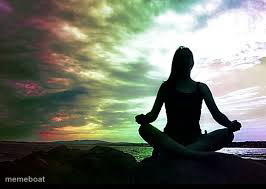
Peaceful silhouette of a person meditating cross-legged against a colorful sunset sky. Ideal for fake-calm or 'inner peace' jokes. Caption it free.
Blank Meditating Silhouette meme template
Download the blank Meditating Silhouette template to caption it yourself, or add your text right here in the editor above and download the finished meme.
When to use the Meditating Silhouette meme
- Pretending to be calm while internally screaming
- Meditating right before checking your phone and losing it
- Faking inner peace during a stressful week
- The version of you that only exists in your head
Meditating Silhouette template facts
- Dimensions
- 266 × 189 px
- Format
- JPG
- Text boxes
- 1
- Added
- 2025
About the Meditating Silhouette meme template
A serene silhouette sits cross-legged against a dramatic, rainbow-tinted sunset, radiating pure zen energy. Looks like the cover of a wellness app, which is exactly why it's so good for undercutting that vibe with a joke.
Popular Meditating Silhouette caption ideas
ME PRETENDING I'M NOT STRESSED ABOUT MONDAY
FINDING MY ZEN RIGHT BEFORE I CHECK MY EMAIL
Templates similar to Meditating Silhouette

Meditating Silhouette meme FAQ
How do I make a Meditating Silhouette meme?
Scroll up to the Meditating Silhouette template, type your caption into the text box in the editor above, adjust the font, size and color if you like, then click download. Your finished Meditating Silhouette meme is ready to share in seconds.
Can I use the Meditating Silhouette template for free?
Yes. The Meditating Silhouette template is completely free to use — no signup and no limits on how many memes you create or where you share them.
How do I download my Meditating Silhouette meme?
Click the download button under the editor once your Meditating Silhouette meme looks right. It saves straight to your device as a high-quality PNG or JPEG image.
How do I download the blank Meditating Silhouette template?
Use the "Download blank template" button in the blank Meditating Silhouette template section above to save the original, un-captioned image — handy if you'd rather caption it in another app or keep a copy.