
X trying to stay in character after being spammed 50 images of Y Meme Generator
Create Your X trying to stay in character after being spammed 50 images of Y Meme
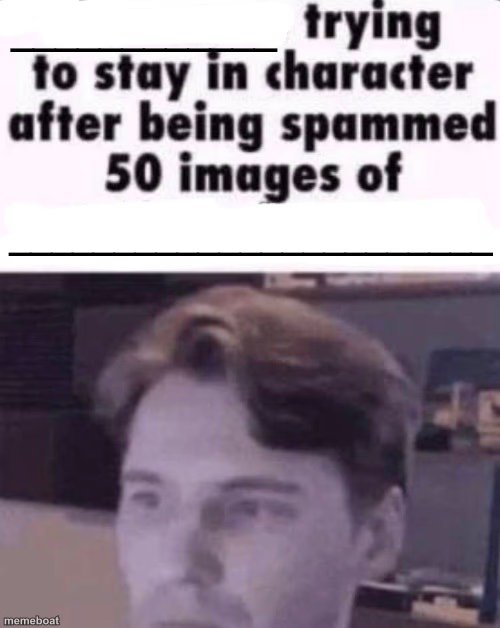
Blank scammer-on-webcam template: he's trying to stay in character after being spammed 50 images of something. Caption it and download free.
Blank X trying to stay in character after being spammed 50 images of Y meme template
Download the blank X trying to stay in character after being spammed 50 images of Y template to caption it yourself, or add your text right here in the editor above and download the finished meme.
X trying to stay in character after being spammed 50 images of Y template facts
- Dimensions
- 500 × 628 px
- Format
- JPG
- Text boxes
- 2
- Added
- 2025
About the X trying to stay in character after being spammed 50 images of Y meme template
This one's straight from the scam-baiting playbook: a webcam feed of some guy caught mid video-call, doing his absolute best to keep a straight face after getting blasted with 50 images of whatever chaos you throw at him. The blank-and-blank format is built for two-part gags — name who's suffering, name what broke them.
It's not just for actual scammers anymore. Use it for anyone forced to hold composure through an onslaught: a customer service rep, a group chat mod, your one friend who still hasn't blocked the ex. Drop in your captions and watch the deadpan do the rest.
Popular X trying to stay in character after being spammed 50 images of Y caption ideas
homosexual_intercourse · him being called out for attention seeking
The tech support scammer · 50 screenshots of the Windows XP bliss wallpaper
The group chat admin · 50 images of the group chat rules
Customer service · 50 pictures of the same broken toaster
Templates similar to X trying to stay in character after being spammed 50 images of Y






X trying to stay in character after being spammed 50 images of Y meme FAQ
How do I make a X trying to stay in character after being spammed 50 images of Y meme?
Scroll up to the X trying to stay in character after being spammed 50 images of Y template, type your caption into the 2 text boxes in the editor above, adjust the font, size and color if you like, then click download. Your finished X trying to stay in character after being spammed 50 images of Y meme is ready to share in seconds.
Can I use the X trying to stay in character after being spammed 50 images of Y template for free?
Yes. The X trying to stay in character after being spammed 50 images of Y template is completely free to use — no signup and no limits on how many memes you create or where you share them.
How do I download my X trying to stay in character after being spammed 50 images of Y meme?
Click the download button under the editor once your X trying to stay in character after being spammed 50 images of Y meme looks right. It saves straight to your device as a high-quality PNG or JPEG image.
How do I download the blank X trying to stay in character after being spammed 50 images of Y template?
Use the "Download blank template" button in the blank X trying to stay in character after being spammed 50 images of Y template section above to save the original, un-captioned image — handy if you'd rather caption it in another app or keep a copy.