
woken up Meme Generator
Create Your woken up Meme
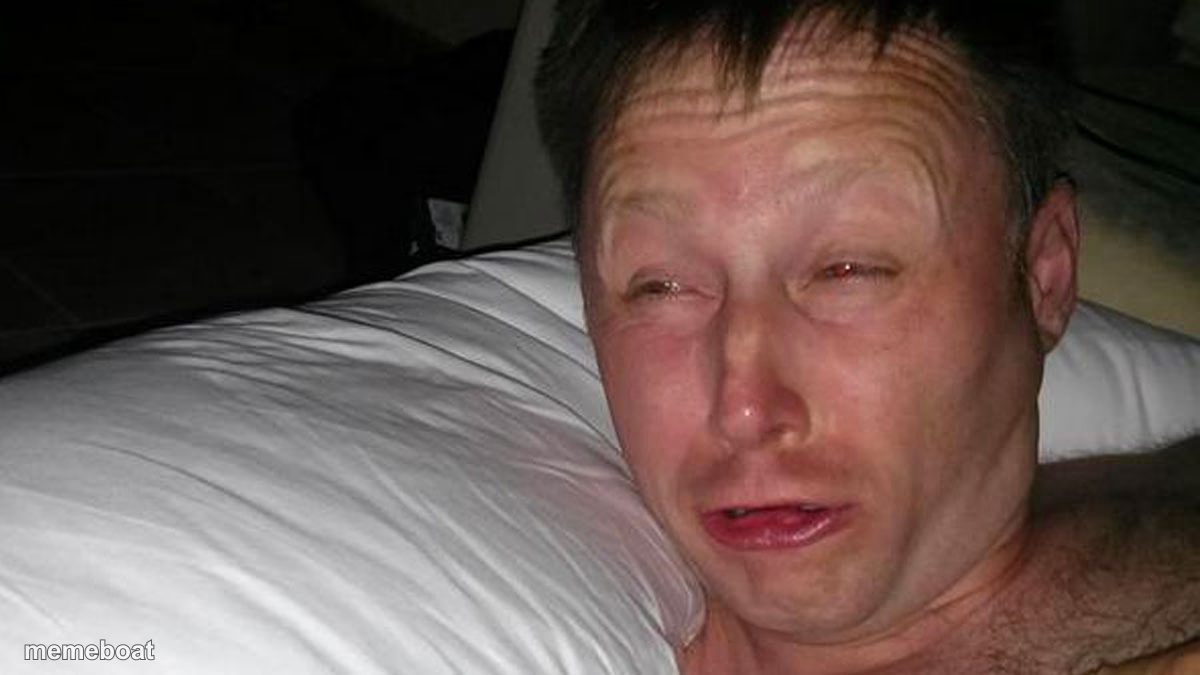
A man freshly woken up, puffy-eyed and groggy on a pillow — perfect for early alarms, rough mornings, and hangover jokes. Caption and download free.
Blank woken up meme template
Download the blank woken up template to caption it yourself, or add your text right here in the editor above and download the finished meme.
When to use the woken up meme
- The 6am alarm going off after four hours of sleep
- Waking up and immediately remembering everything you regret from last night
- Getting dragged out of bed for a 'quick call' that's actually a meeting
- Realizing it's a work day, not the weekend
woken up template facts
- Dimensions
- 1200 × 675 px
- Format
- JPG
- Text boxes
- 2
- Added
- 2025
About the woken up meme template
That specific face you make three seconds after the alarm goes off, before your brain has agreed to participate in the day. Puffy eyes, crooked hair, the general aura of 'why is this happening to me.'
Use it for anything alarm-related, hangover-adjacent, or just the horror of realizing it's Monday. It's the most honest morning photo ever taken and it deserves to be a caption legend.
Popular woken up caption ideas
Me at 6am · realizing I hit snooze four times
Nobody: · My alarm at 6:00 AM sharp
Templates similar to woken up


woken up meme FAQ
How do I make a woken up meme?
Scroll up to the woken up template, type your caption into the 2 text boxes in the editor above, adjust the font, size and color if you like, then click download. Your finished woken up meme is ready to share in seconds.
Can I use the woken up template for free?
Yes. The woken up template is completely free to use — no signup and no limits on how many memes you create or where you share them.
How do I download my woken up meme?
Click the download button under the editor once your woken up meme looks right. It saves straight to your device as a high-quality PNG or JPEG image.
How do I download the blank woken up template?
Use the "Download blank template" button in the blank woken up template section above to save the original, un-captioned image — handy if you'd rather caption it in another app or keep a copy.