
Meme Man Wizdum Meme Generator
Create Your Meme Man Wizdum Meme
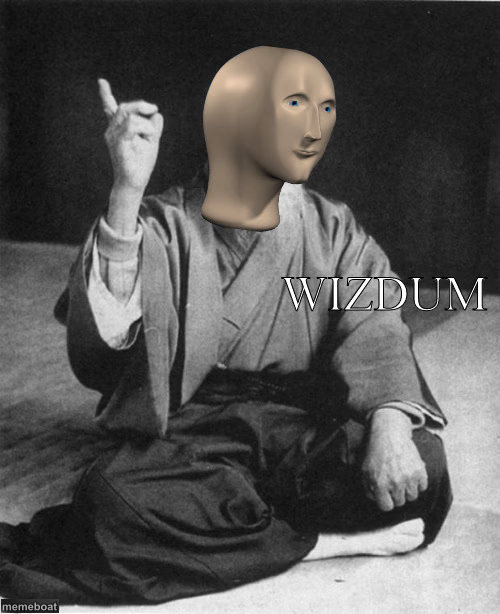
Meme Man dressed as a monk delivering 'WIZDUM' with a raised finger — the deadpan format for fake-deep advice. Caption and download it free.
Blank Meme Man Wizdum meme template
Download the blank Meme Man Wizdum template to caption it yourself, or add your text right here in the editor above and download the finished meme.
When to use the Meme Man Wizdum meme
- Delivering objectively bad advice with total confidence
- Fake-deep quotes that fall apart on second read
- The friend who explains something wrong like it's gospel
- Captioning any 'well actually' moment
Meme Man Wizdum template facts
- Featuring
- Meme Man (Meme Man / stock character memes)
- Dimensions
- 500 × 614 px
- Format
- JPG
- Added
- 2025
About the Meme Man Wizdum meme template
That flat, expressionless Meme Man head photoshopped onto a seated monk figure, one finger raised like he's about to drop life-changing advice — except it's spelled 'WIZDUM' because the joke is that it's definitely not wisdom.
Perfect for mock-profound statements, bad life advice delivered with total confidence, or any 'here's a fact nobody asked for' moment.
Templates similar to Meme Man Wizdum



Meme Man Wizdum meme FAQ
How do I make a Meme Man Wizdum meme?
Scroll up to the Meme Man Wizdum template, add your own text boxes in the editor above and type your captions, adjust the font, size and color if you like, then click download. Your finished Meme Man Wizdum meme is ready to share in seconds.
Can I use the Meme Man Wizdum template for free?
Yes. The Meme Man Wizdum template is completely free to use — no signup and no limits on how many memes you create or where you share them.
How do I download my Meme Man Wizdum meme?
Click the download button under the editor once your Meme Man Wizdum meme looks right. It saves straight to your device as a high-quality PNG or JPEG image.
How do I download the blank Meme Man Wizdum template?
Use the "Download blank template" button in the blank Meme Man Wizdum template section above to save the original, un-captioned image — handy if you'd rather caption it in another app or keep a copy.